Networks B05
Addendum of Azure Load Balancer and NSG Rules
In this dispatch 2 sections
1 AllowAzureLoadBalancerInBound NSG Rule
Every Azure network security group (NSG) includes a default rule named AllowAzureLoadBalancerInBound.
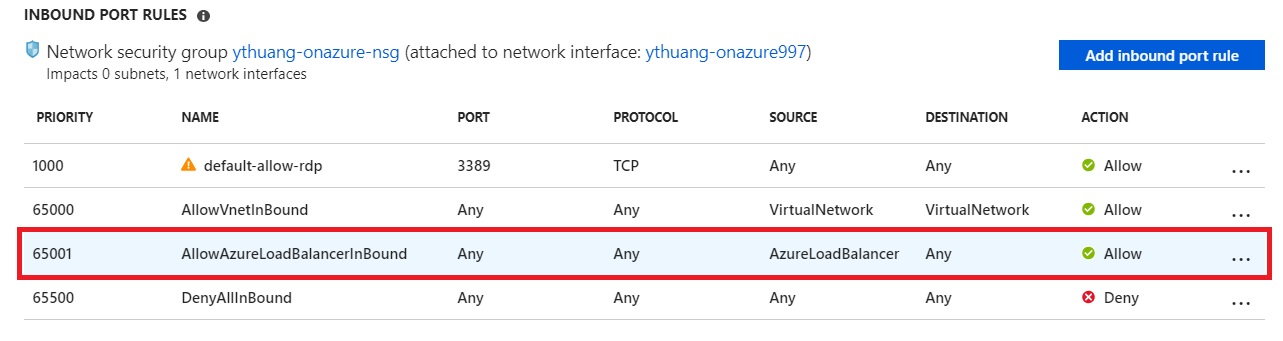
You might wonder what this NSG rule means. It allows Azure Load Balancer health probes, not application traffic. The load balancer probes the backend to detect whether the backend service is healthy. For IPv4 probes, the source IP is 168.63.129.16, represented by the AzureLoadBalancer service tag.
Refer to Network security
Virtual IP of the host node: Basic infrastructure services such as DHCP, DNS, and health monitoring are provided through the virtualized host IP addresses 168.63.129.16 and 169.254.169.254. These public IP addresses belong to Microsoft and are the only virtualized IP addresses used in all regions for this purpose. The addresses map to the physical IP address of the server machine (host node) hosting the virtual machine. The host node acts as the DHCP relay, the DNS recursive resolver, and the probe source for the load balancer health probe and the machine health probe.
2 How to set up an NSG rule to allow load-balanced traffic
If we are going to allow load-balanced inbound traffic, the NSG rule should always use the “backend port” as the destination port. For example, if we create a load-balancing rule to open port 80 from the load balancer public IP address while using 8080 as the backend port, then the corresponding NSG rule should allow port 8080 as the destination port, not port 80.