Networks B07
Azure Load Balancer SNAT behavior explained - annotations on TCP port reuse, ACKs with wrong sequence numbers, RSTs from 3-way handshakes, and SNAT port exhaustion
This article discusses Azure external Load Balancer SNAT, explains several behaviors observed in network traces, and provides suggestions for applications behind a load balancer that require SNAT.

In this dispatch 9 sections
Notice: This article was published a few years ago. Some information may no longer be correct, so please refer to the official Azure documentation for the latest guidance.
0 Summary
Yes, a summary — no kidding :). If you don’t have time to read the whole article, try following these suggestions:
- Use TCP keepalive in applications behind a load balancer to avoid idle connections being torn down from the host flow table.
- Consider using Azure Standard Load Balancer and enabling the Load Balancer with TCP Reset on Idle (Public Preview) feature.
- Most of the time, TCP port reuse is not a problem.
- SNAT port exhaustion can also happen when the guest OS has only a few active connections. Avoid creating and closing outbound connections aggressively, reuse existing connections, and follow suggestion 1.
1 Azure Load Balancer SNAT Introduction
Azure Load Balancer has two types: internal and external. This article addresses the external load balancer and focuses on SNAT. It explains several behaviors observed in network traces.
Azure external Load Balancer is a service that simply does two things:
- Distributes inbound traffic against its public IP to back-end instances.
- Source NATs outbound traffic from backend instances by translating private IP addresses to its public IP address.
NOTE: A backend instance is usually a VM, or services running on a VM, and the VM is running on a host.
A typical SNAT traffic flow looks like this:
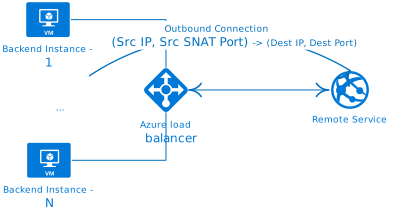
For an overview of Azure load balancer, refer to article What is Azure Load Balancer?
1.1 SNAT
When applying outbound SNAT, the outbound traffic’s source IP and source port are rewritten to the load balancer’s public IP and a SNAT port. Because SNAT ports are limited resources (a port number is a 16-bit integer ranging from 0 to 65535), the load balancer preallocates SNAT ports to backend server instances, as documented in Ephemeral port preallocation for port masquerading SNAT (PAT).
| Pool size (VM instances) | Preallocated SNAT ports per IP configuration |
|---|---|
| 1-50 | 1,024 |
| 51-100 | 512 |
| 101-200 | 256 |
| 201-400 | 256 |
| 401-800 | 64 |
| 801-1,000 | 32 |
| NOTE: Preallocated SNAT ports are adjustable in Azure Standard Load Balancer. To make this article easy to understand, we presume each backend instance has limited SNAT ports assigned according to the table above. |
1.2 SNAT port exhaustion
When a backend instance makes outbound connections, each connection has a SNAT port allocated from the instance’s NAT pool. When SNAT port resources are exhausted, outbound connections fail until SNAT ports are released. This is known as SNAT port exhaustion.
1.3 SNAT port reuse
In addition to the limited SNAT ports allocated for each backend instance, the backend instance’s host also maintains a flow table to record SNAT mapping information (Source IP, Port -> Public IP, SNAT Port). If the outbound connection is a TCP connection, some TCP state information is also maintained in the flow table. The host flow table is used to track outbound connection state and release SNAT ports back to the NAT pool. Once a SNAT port is released and returned to the NAT pool, a new connection can reuse the same SNAT port (SNAT port reuse). SNAT ports are released under the following conditions; refer to SNAT port release.
TCP SNAT port release
If either server/client sends FINACK, SNAT port will be released after 240 seconds.
If a RST is seen, SNAT port will be released after 15 seconds. If idle timeout has been reached, port is released.
UDP SNAT port release
If idle timeout has been reached, port is released.
2 Typical observations and issues
Load Balancer SNAT can cause complicated issues because the guest OS also maintains TCP/UDP state. This is especially true for TCP if the host flow table is not consistent with the guest OS TCP/IP stack.
Here are some typical observations and issues
2.1 Observation 1 - TCP port numbers reused
TCP port reuse can happen in the following circumstances when Azure Load Balancer is used.
2.1.1 TCP port number gets reused by new connection when old connection gets reset
When a TCP connection is reset, Azure Load Balancer releases the SNAT port back to the NAT pool, according to SNAT port reuse:
You can think of SNAT ports as a sequence from lowest to highest available for a given scenario, and the first available SNAT port is used for new connections.
This basically means that after 15 seconds (If a RST is seen, SNAT port will be released after 15 seconds), a new outbound connection will use the same SNAT port if no other connection has been made. If the destination keeps resetting the connection, new connections from the source will keep using the same SNAT port at 15-second intervals.
For example, in the screenshot below, 52.187.X.X is the public IP of the Azure load balancer. When the destination 62.209.X.X resets the connection, you can see the same SNAT port number reused right after 15 seconds (frame 269).

Will port reuse be a problem when the previous connection was reset? The answer is no, because both the host flow table and the guest OS TCP/IP stack have removed the connection state; a new connection is truly a new connection.
2.1.2 TCP port number gets reused after connection gracefully closed
When a TCP connection is gracefully closed (If either server/client sends FINACK, SNAT port will be released after 240 seconds.), for example, if the source closes the connection, the guest OS will put the corresponding socket in the TIME_WAIT state. The host will also put the corresponding flow in the TIME_WAIT state and release the SNAT port after 240 seconds. The guest OS default TIME_WAIT duration is 120 seconds in Windows (adjustable through TcpTimedWaitDelay) and 60 seconds in Linux (non-adjustable). Therefore, when the SNAT port is released back to the NAT pool and reused for a new connection, the old TCP connection is already long gone from the guest OS, which makes the guest OS see the new connection as a new connection. In that case, TCP port reuse won’t be a problem because both the host flow table and the guest OS are in sync.
2.1.3 TCP port number gets reused when connection idle time reached
When an outbound connection is idle for too long without any activity (If idle timeout has been reached, port is released.), the default timeout is 240 seconds in Azure Load Balancer. Its flow will be removed from the host flow table. Basically, this means the connection has been torn down in the host flow table, the SNAT port is released back to the NAT pool, and a new connection can reuse the SNAT port. However, from the source guest OS’s perspective, the connection is still technically alive in its TCP/IP stack (established). Strange behavior can occur because the host flow table is out of sync with the guest OS TCP/IP stack.
For example, from the tcpdump trace below, we can see TCP port reuse as well as an ACK with the wrong sequence number plus a RST from the 3-way handshake. The trace is captured from the destination side. 52.187.X.X is the load balancer public IP and port 2560 is the SNAT port; 62.209.X.X is the destination IP and 5000 is the destination port.
[1] 10:11:54.310366 IP 52.187.X.X.2560 > 62.209.X.X.5000: Flags [S], seq 3315641323, win 29200, options [mss 1440,s451 ecr 0,nop,wscale 7], length 0
[2] 10:11:54.310423 IP 62.209.X.X.5000 > 52.187.X.X.2560: Flags [S.], seq 3490535665, ack 3315641324, win 28960, opOK,TS val 1094630349 ecr 1164401451,nop,wscale 7], length 0
[3] 10:11:54.311100 IP 52.187.X.X.2560 > 62.209.X.X.5000: Flags [.], ack 3490535666, win 229, options [nop,nop,TS v94630349], length 0
…
[4] 10:16:31.860969 IP 52.187.X.X.2560 > 62.209.X.X.5000: Flags [S], seq 2233907357, win 29200, options [mss 1440,s002 ecr 0,nop,wscale 7], length 0
[5] 10:16:31.861002 IP 62.209.X.X.5000 > 52.187.X.X.2560: Flags [.], ack 3315641324, win 227, options [nop,nop,TS v64401453], length 0
[6] 10:16:31.862546 IP 52.187.X.X.2560 > 62.209.X.X.5000: Flags [R], seq 3315641324, win 0, length 0
[7] 10:16:32.863887 IP 52.187.X.X.2560 > 62.209.X.X.5000: Flags [S], seq 2233907357, win 29200, options [mss 1440,s005 ecr 0,nop,wscale 7], length 0
[8] 10:16:32.863944 IP 62.209.X.X.5000 > 52.187.X.X.2560: Flags [S.], seq 3547967158, ack 2233907358, win 28960, opOK,TS val 1094908903 ecr 1164680005,nop,wscale 7], length 0
[9] 10:16:32.864836 IP 52.187.X.X.2560 > 62.209.X.X.5000: Flags [.], ack 3547967159, win 229, options [nop,nop,TS v94908903], length 0
- Frames 1-3: the first connection is established after the TCP 3-way handshake.
- After more than 4 minutes, a new connection is made with the same SNAT port (frame 4). The destination ACKs the wrong sequence number (frame 5), so the source resets the connection (frame 6). The source retransmits SYN again (frame 7), and the TCP 3-way handshake completes with frames 8 and 9. Frames 4-9 are actually made by a single API call,
connect(). The guest OS TCP/IP stack handles all the work; the application that callsconnect()is not aware of the TCP RST and only sees theconnect()call succeed. - What happens here is:
- The first connection reached idle timeout. The backend instance’s host removed the corresponding flow from its flow table and released the SNAT port back to the NAT pool.
- The second connection reused the SNAT port and sent a TCP SYN to the destination. Because the five-tuple (protocol, source IP, source port, destination IP, destination port) is the same, the destination thinks it belongs to the first connection, but it contains an unexpected TCP sequence number. Therefore, the destination ACKs the last sequence number + 1 that it had previously seen from the source (same as frame 2).
- The source guest OS receives an ACK with the wrong sequence number during the second connection’s 3-way handshake, so it sends a RST packet to the destination. Once the destination receives the RST packet, it tears down the first connection from its TCP/IP stack, so the first connection’s state is gone from the destination guest OS.
- When the source retransmits the second connection’s SYN to the destination, the first connection’s state is gone from the destination, so the 3-way handshake eventually completes.
- Now the source guest OS will have two active outbound connections to the destination. Why? From the guest OS perspective, the first outbound connection uses source IP and source port A. When the guest OS makes the second connection, the first connection is still alive, so port A won’t be reused. Another source port, port B, will be allocated by the guest OS. Run
ss -taeip dport = :5000to show the two connections in the guest OS.
State       Recv-Q Send-Q                 Local Address:Port                                  Peer Address:Port
ESTAB       0      0                         172.16.0.5:55546                               62.209.X.X:5000                  users:(("client",pid=6467,fd=3)) uid:1000 ino:74305375 sk:9d <->
	 ts sack cubic wscale:7,7 rto:200 rtt:1.634/0.817 ato:40 mss:1428 cwnd:10 bytes_acked:1 bytes_received:26 segs_out:3 segs_in:2 send 69.9Mbps lastsnd:15308 lastrcv:15308 lastack:15308 pacing_rate 139.8Mbps rcv_space:29200
ESTAB       0      0                         172.16.0.5:52868                               62.209.X.X:5000                  users:(("client",pid=129270,fd=3)) uid:1000 ino:74277694 sk:7f <->
ts sack cubic wscale:7,7 rto:200 rtt:1.6/0.8 ato:40 mss:1428 cwnd:10 bytes_acked:1 bytes_received:26 segs_out:3 segs_in:2 send 71.4Mbps lastsnd:457212 lastrcv:457212 lastack:457212 pacing_rate 142.8Mbps rcv_space:29200- As the first connection reached idle timeout in the host flow table, the old flow is removed. The second connection creates a new flow that maps source IP and source port B to the load balancer’s public IP and SNAT port. From here, inbound/outbound traffic only happens on the second connection because there is no mapping for the first connection in the host flow table. This leaves an orphaned connection in the guest OS, consuming resources and never getting a chance to release. It could get worse if the source wants to send data on the first connection: the guest OS TCP/IP stack will retransmit the data again and again until it reaches timeout. In Linux, by default, that could be 15 minutes later. Refer to Linux TCP_RTO_MIN, TCP_RTO_MAX and the tcp_retries2 sysctl. If the application uses a thread/thread pool and calls the blocking I/O API
send()to send data, then the thread could block here for 15 minutes.
2.1.4 Solution to avoid idle outbound TCP connections
- Use TCP keepalive to avoid idle connections being torn down from the host flow table. TCP keepalive can be enabled on both the source and destination sides. When enabled, the TCP/IP stack sends keepalive packets over the connection to determine whether the connection is still valid and terminates it if needed. Because the host keeps seeing traffic between the source and destination, it will not remove the corresponding flow from its flow table.
- If Azure Standard Load Balancer is used, there is a preview feature called Load Balancer with TCP Reset on Idle (Public Preview). Enabling this feature causes Load Balancer to send bidirectional TCP Resets (TCP RST packets) on idle timeout. This informs the guest OS to tear down the TCP state, so both the guest OS and the host stay in sync.
2.2 Observation 2 - SNAT port exhaustion without too many active connections
When SNAT port exhaustion occurs, applications on backend instances cannot establish outbound connections to the destination because no SNAT port is available, and the TCP SYN is silently dropped by the host. Depending on the application’s behavior, if blocking I/O connect() is used, the application will hang for a while until it can get a SNAT port or times out when the SYN retransmission timeout is reached. If the application uses non-blocking I/O (for example, epoll() with connect()), when timeout is reached, the application will abort the connection and report a timeout error.
SNAT port exhaustion is usually seen when the guest OS has too many active connections, but it can also happen when there are not too many active connections in the guest OS. To explain how it happens, consider an application that:
- Temporarily creates many outbound connections to the destination in a very short time and consumes all SNAT ports from the NAT pool.
- Has its connections actively closed by the destination after data is sent.
In that case, the guest OS TCP/IP stack has already removed the TCP connection state when the connection was closed, while the host still keeps the flow in its flow table (If either server/client sends FINACK, SNAT port will be released after 240 seconds.). Because the SNAT port has not been released yet (TIME_WAIT state in the host flow table), a new outbound connection from the guest OS can still run into SNAT port exhaustion.
For example, the tcpdump output below shows the application trying to resend TCP SYN and eventually connecting to the destination on the second try.
03:52:03.626271 IP 172.16.0.5.33858 > 62.209.X.X:5000: Flags [S], seq 4184725213, win 29200, options [mss 1460,sackOK,TS val 4219049655 ecr 0,nop,wscale 7], length 0
…
03:53:08.729123 IP 172.16.0.5.33858 > 62.209.X.X:5000: Flags [S], seq 4184725213, win 29200, options [mss 1460,sackOK,TS val 4219114758 ecr 0,nop,wscale 7], length 0
// First connect request is timed out
03:54:14.276328 IP 172.16.0.5.34648 > 62.209.X.X:5000: Flags [S], seq 671129119, win 29200, options [mss 1460,sackOK,TS val 4219180305 ecr 0,nop,wscale 7], length 0
03:54:14.277685 IP 62.209.X.X:5000 > 172.16.0.5.34648: Flags [S.], seq 1174869554, ack 671129120, win 28960, options [mss 1440,sackOK,TS val 1140667722 ecr 4219180305,nop,wscale 7], length 0
03:54:14.277783 IP 172.16.0.5.34648 > 62.209.X.X:5000: Flags [.], ack 1, win 229, options [nop,nop,TS val 4219180306 ecr 1140667722], length 0
// Second connect request is succeeded
The key to avoiding this kind of issue is to reuse connections instead of creating new ones.
3 Wrap it up
Please see “0 Summary” :)