Cloud Native C09
Kubernetes Services and iptables
In this dispatch 21 sections
Note (May 2026): This article analyzes kube-proxy iptables behavior from an older Kubernetes/kubenet environment. The fundamentals are still valuable, but current clusters may use IPVS, nftables backends, eBPF-based data planes, different cloud load-balancer behavior, or newer Service API details. Validate assumptions against the Kubernetes version and CNI used in your cluster.
0 Prerequisites and Prework
This post focuses on how Kubernetes leverages iptables to implement its service mode. Per the official Services documentation:
A Kubernetes Service is an abstraction which defines a logical set of Pods and a policy by which to access them - sometimes called a micro-service.
Put simply, a Service represents a TCP or UDP load-balanced service. As it is load-balanced, it must use destination NAT (DNAT) to redirect inbound traffic to backend pods, relying on iptables from the Linux OS to do the job. When a Service is created, kube-proxy (DaemonSet) will inject a few iptables chains and rules into the agent node. Accessing a Kubernetes Service relies on DNAT. Also, if the source IP is from an external network (not in the Pod IP CIDR), the source IP will also be SNAT-ed.
This post assumes the end user is familiar with iptables. If not, there is a good article that explains iptables in detail: Iptables Tutorial 1.2.2. It is worth reading.
This post will not cover pod-to-pod communication, as it is out of scope. Pod-to-pod communication relies on IP routing; Cluster Networking provides more information.
all containers can communicate with all other containers without NAT
all nodes can communicate with all containers (and vice-versa) without NAT
the IP that a container sees itself as is the same IP that others see it as
This article covers three Kubernetes Service types described in Publishing services - service types:
- ClusterIP
- NodePort
- LoadBalancer
In the following sections, we will discuss each Service one by one. The fourth type, ExternalName, returns a DNS CNAME record and is outside this article’s iptables-focused scope.
1 Environment
The sample Kubernetes cluster’s network setup is below.
- Pod IP CIDR: 10.244.0.0/16
- Node IP CIDR: 10.244.1.0/24
- Cluster IP CIDR: 10.0.0.0/16
The cluster uses kubenet plug-in to implement the bridge(cbr0) and host-local CNI plugins, agent node’s network interfaces should have
#ifconfig -a
cbr0      Link encap:Ethernet  HWaddr 82:26:7d:43:26:2c
          inet addr:10.244.1.1  Bcast:0.0.0.0  Mask:255.255.255.0
          inet6 addr: fe80::8026:7dff:fe43:262c/64 Scope:Link
          UP BROADCAST RUNNING MULTICAST  MTU:1500  Metric:1
          RX packets:6161105 errors:0 dropped:0 overruns:0 frame:0
          TX packets:5554960 errors:0 dropped:0 overruns:0 carrier:0
          collisions:0 txqueuelen:1000
          RX bytes:1023024859 (1.0 GB)  TX bytes:6444977005 (6.4 GB)
...

eth0      Link encap:Ethernet  HWaddr 00:0d:3a:a2:8d:f5
          inet addr:10.240.0.5  Bcast:10.240.255.255  Mask:255.255.0.0
          inet6 addr: fe80::20d:3aff:fea2:8df5/64 Scope:Link
          UP BROADCAST RUNNING MULTICAST  MTU:1500  Metric:1
          RX packets:13829425 errors:0 dropped:0 overruns:0 frame:0
          TX packets:10841327 errors:0 dropped:0 overruns:0 carrier:0
          collisions:0 txqueuelen:1000
          RX bytes:10845741411 (10.8 GB)  TX bytes:2219795638 (2.2 GB)

...

veth23307616 Link encap:Ethernet  HWaddr 5a:e1:28:c8:20:d7
          inet6 addr: fe80::58e1:28ff:fec8:20d7/64 Scope:Link
          UP BROADCAST RUNNING MULTICAST  MTU:1500  Metric:1
          RX packets:668419 errors:0 dropped:0 overruns:0 frame:0
          TX packets:700410 errors:0 dropped:0 overruns:0 carrier:0
          collisions:0 txqueuelen:0
          RX bytes:150126499 (150.1 MB)  TX bytes:1593031464 (1.5 GB)
cbr0 is a Linux bridge device, and eth0 is an Ethernet device. Every time a Pod is created, a virtual Ethernet device (vethxxxxxxxx) will be created. That veth device will get connected to bridge device cbr0. As all Pods’ network interfaces are plugged into the same bridge device, all Pods on the same agent node can communicate with each other.
#brctl show
bridge name	bridge id		STP enabled	interfaces
cbr0		8000.82267d43262c	no		veth0abdd6ef
							veth218b42ec
							veth23307616
							veth2beb9e80
							veth32de6a73
							veth3309ba9e
							veth3b498f61
							veth41ecf4ee
							veth44fcd74a
							veth63b06052
							veth81cd642e
							veth8ba701b0
							vethc4eba469
							vethea582003
							vethf248ae55
2 How Kubernetes Uses iptables for Services
Before explaining each type of Service’s implementation in iptables, we need to understand how Kubernetes plugs itself into iptables.
2.1 Custom chain
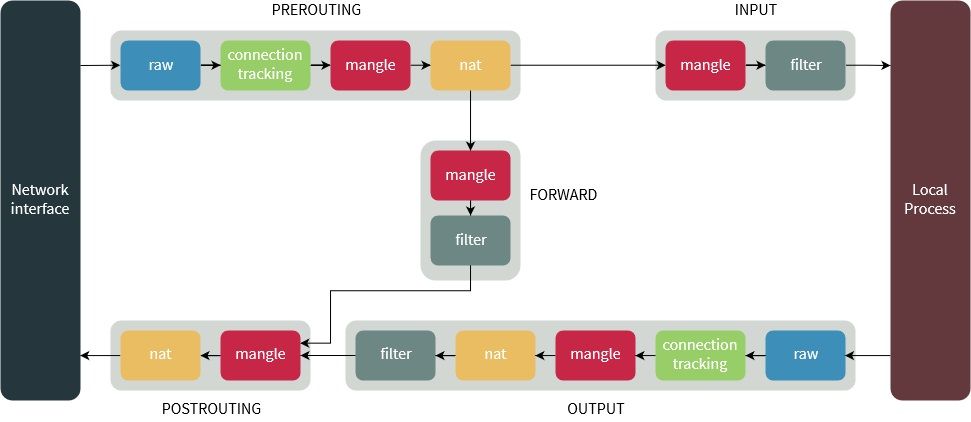
To hook into packet filtering and NAT, Kubernetes will create a custom chain, KUBE-SERVICES, in iptables. It will redirect all PREROUTING and OUTPUT traffic to the custom chain KUBE-SERVICES, as shown below.
-A PREROUTING -m comment --comment "kubernetes service portals" -j KUBE-SERVICES
...
-A OUTPUT -m comment --comment "kubernetes service portals" -j KUBE-SERVICES
...
The PREROUTING chain is used to handle inbound traffic from external networks as well as inbound traffic from the Pod network.
The OUTPUT chain is used to handle outbound traffic to external networks as well as outbound traffic to the Pod network.
After using the KUBE-SERVICES chain to hook into packet filtering and NAT, Kubernetes can inspect traffic to its Services and apply SNAT/DNAT accordingly.
The KUBE-SERVICES chain is used for Service types ClusterIP and LoadBalancer. At the end of the KUBE-SERVICES chain, it will install another custom chain, KUBE-NODEPORTS, to handle traffic for the specific Service type NodePort, as shown below.
-A KUBE-SERVICES -m comment --comment "kubernetes service nodeports; NOTE: this must be the last rule in this chain" -m addrtype --dst-type LOCAL -j KUBE-NODEPORTSStarting from the KUBE-SERVICES custom chain, Kubernetes will create a few custom chains that eventually represent a Service. For example:
- KUBE-SERVICES->KUBE-SVC-XXXXXXXXXXXXXXXX->KUBE-SEP-XXXXXXXXXXXXXXXX represents a ClusterIP Service
- KUBE-NODEPORTS->KUBE-SVC-XXXXXXXXXXXXXXXX->KUBE-SEP-XXXXXXXXXXXXXXXX represents a NodePort Service
2.2 SNAT
If we dump iptables from the agent node, we will find the chains and rules below created for a specific Service. Those chains and rules are used for external-network-to-Service communication. If the source IP address is not from the Pod IP CIDR, the source IP will be SNAT-ed. For details, refer to Using Source IP.
*nat
...
-A KUBE-SERVICES ! -s 10.244.0.0/16 -d 10.0.0.10/32 -p udp -m comment --comment "kube-system/kube-dns:dns cluster IP" -m udp --dport 53 -j KUBE-MARK-MASQ
...
-A KUBE-MARK-MASQ -j MARK --set-xmark 0x4000/0x4000
...
-A KUBE-POSTROUTING -m comment --comment "kubernetes service traffic requiring SNAT" -m mark --mark 0x4000/0x4000 -j MASQUERADE
For example, if we do a name lookup from the agent node against the Kubernetes DNS service, the source IP is the agent node IP (in our case, 10.240.0.5). It is not in the Pod IP CIDR, so it will be treated as an external IP.
#dig -b 10.240.0.5 @10.0.0.10 www.microsoft.com

; <<>> DiG 9.10.3-P4-Ubuntu <<>> -b 10.240.0.5 @10.0.0.10 www.microsoft.com
; (1 server found)
;; global options: +cmd
;; Got answer:
;; ->>HEADER<<- opcode: QUERY, status: NOERROR, id: 46238
;; flags: qr rd ra; QUERY: 1, ANSWER: 4, AUTHORITY: 0, ADDITIONAL: 1

;; OPT PSEUDOSECTION:
; EDNS: version: 0, flags:; udp: 1280
;; QUESTION SECTION:
;www.microsoft.com.		IN	A

;; ANSWER SECTION:
www.microsoft.com.	6	IN	CNAME	www.microsoft.com-c-3.edgekey.net.
www.microsoft.com-c-3.edgekey.net. 6 IN	CNAME	www.microsoft.com-c-3.edgekey.net.globalredir.akadns.net.
www.microsoft.com-c-3.edgekey.net.globalredir.akadns.net. 6 IN CNAME e13678.dspb.akamaiedge.net.
e13678.dspb.akamaiedge.net. 6	IN	A	23.67.3.108

;; Query time: 2 msec
;; SERVER: 10.0.0.10#53(10.0.0.10)
;; WHEN: Wed Feb 06 06:26:00 UTC 2019
;; MSG SIZE  rcvd: 351
IP address 10.240.0.5 will be SNAT-ed to the cbr0 IP address, 10.244.1.1. Refer to the TCPDUMP output below.
#tcpdump -i any port 53 -n -e -S
tcpdump: verbose output suppressed, use -v or -vv for full protocol decode
listening on any, link-type LINUX_SLL (Linux cooked), capture size 262144 bytes
...
06:26:00.243425 Out 82:26:7d:43:26:2c ethertype IPv4 (0x0800), length 90: 10.244.1.1.52173 > 10.244.1.58.53: 46238+ [1au] A? www.microsoft.com. (46)
06:26:00.243432 Out 82:26:7d:43:26:2c ethertype IPv4 (0x0800), length 90: 10.244.1.1.52173 > 10.244.1.58.53: 46238+ [1au] A? www.microsoft.com. (46)
...

06:26:00.245375   P ca:44:10:89:95:7a ethertype IPv4 (0x0800), length 395: 10.244.1.58.53 > 10.244.1.1.52173: 46238 4/0/1 CNAME www.microsoft.com-c-3.edgekey.net., CNAME www.microsoft.com-c-3.edgekey.net.globalredir.akadns.net., CNAME e13678.dspb.akamaiedge.net., A 23.67.3.108 (351)
06:26:00.245375  In ca:44:10:89:95:7a ethertype IPv4 (0x0800), length 395: 10.244.1.58.53 > 10.240.0.5.52173: 46238 4/0/1 CNAME www.microsoft.com-c-3.edgekey.net., CNAME www.microsoft.com-c-3.edgekey.net.globalredir.akadns.net., CNAME e13678.dspb.akamaiedge.net., A 23.67.3.108 (351)
If we check netfilter connection tracking table, a corresponding mapping entry will be created similar like below
#conntrack -L | grep 52173
...
udp      17 22 src=10.240.0.5 dst=10.0.0.10 sport=52173 dport=53 src=10.244.1.58 dst=10.244.1.1 sport=53 dport=52173 mark=0 use=1
...
3 ClusterIP
3.1 ClusterIP introduction
Before discussing the ClusterIP Service in detail, we will deploy two Redis replicas by running kubectl apply -f redis.yaml and use the setup to explain five types of ClusterIP Services by creating each type of Service in the following subsections.
- ClusterIP service
- ClusterIP service with session affinity
- ClusterIP with external IPs
- ClusterIP service without any endpoints
- Headless service
The sample two replicas deployment file is below
#redis.yaml
apiVersion: apps/v1beta1
kind: Deployment
metadata:
  name: redis
spec:
  replicas: 2
  template:
    metadata:
      labels:
        app: redis
    spec:
      containers:
      - name: redis
        image: redis
        ports:
        - containerPort: 6379
          name: redis
3.2 ClusterIP(redis)
Defining a ClusterIP Service is pretty simple. Below is a template to create a Redis ClusterIP Service. Simply run kubectl apply -f redis-clusterip.yaml to deploy it.
#redis-clusterip.yaml
apiVersion: v1
kind: Service
metadata:
  name: redis
spec:
  ports:
  - port: 6379
  selector:
    app: redis
Kubernetes should create a Service called “redis”. In my cluster setup, its cluster IP address is 10.0.19.85, and it has two endpoints pointing to two Redis pods. Their IP addresses are 10.244.1.69 and 10.244.1.70.
#kubectl get service redis
NAME    TYPE        CLUSTER-IP   EXTERNAL-IP   PORT(S)    AGE
redis   ClusterIP   10.0.19.85   <none>        6379/TCP   3d4h

#kubectl get endpoints redis
NAME    ENDPOINTS                           AGE
redis   10.244.1.69:6379,10.244.1.70:6379   3d4h
The ClusterIP Service’s IP does not exist anywhere. Although the IP address is in the cluster IP CIDR, it is not linked to any process. It is a virtual IP address, and Kubernetes will register a DNS A record to associate the Service’s DNS name with it.
#nslookup redis.default.svc.cluster.local 10.0.0.10
Server:		10.0.0.10
Address:	10.0.0.10#53

Name:	redis.default.svc.cluster.local
Address: 10.0.19.85
The ClusterIP Service’s IP is normally accessible within the cluster, not directly from external networks. External access requires additional routing or exposure through a NodePort, LoadBalancer, or proxy. In this lab’s iptables mode, kube-proxy creates the following chains and rules for Service “redis” (adjusted for readability).
-A KUBE-SERVICES ! -s 10.244.0.0/16 -d 10.0.19.85/32 -p tcp -m comment --comment "default/redis: cluster IP" -m tcp --dport 6379 -j KUBE-MARK-MASQ
-A KUBE-SERVICES -d 10.0.19.85/32 -p tcp -m comment --comment "default/redis: cluster IP" -m tcp --dport 6379 -j KUBE-SVC-SCFPZ36VFLUNBB47

-A KUBE-SVC-SCFPZ36VFLUNBB47 -m statistic --mode random --probability 0.50000000000 -j KUBE-SEP-UH5EYFQKYB24RWKN
-A KUBE-SVC-SCFPZ36VFLUNBB47 -j KUBE-SEP-5MXPM55VLN7O52FQ

-A KUBE-SEP-UH5EYFQKYB24RWKN -s 10.244.1.69/32 -j KUBE-MARK-MASQ
-A KUBE-SEP-UH5EYFQKYB24RWKN -p tcp -m tcp -j DNAT --to-destination 10.244.1.69:6379

-A KUBE-SEP-5MXPM55VLN7O52FQ -s 10.244.1.70/32 -j KUBE-MARK-MASQ
-A KUBE-SEP-5MXPM55VLN7O52FQ -p tcp -m tcp -j DNAT --to-destination 10.244.1.70:6379
Starting from chain KUBE-SERVICES, inbound traffic to that Service will be randomly distributed to endpoint 10.244.1.69:6379 or endpoint 10.244.1.70:6379. This is done by iptables DNAT rules -A KUBE-SEP-UH5EYFQKYB24RWKN -p tcp -m tcp -j DNAT --to-destination 10.244.1.69:6379 and -A KUBE-SEP-5MXPM55VLN7O52FQ -p tcp -m tcp -j DNAT --to-destination 10.244.1.70:6379.
The load-balancing algorithm is provided by the iptables module “statistic”. In the two-Redis-replica deployment, the “statistic” module will randomly choose one of the two backend endpoints based on the iptables rules below.
-A KUBE-SVC-SCFPZ36VFLUNBB47 -m statistic --mode random --probability 0.50000000000 -j KUBE-SEP-UH5EYFQKYB24RWKN
-A KUBE-SVC-SCFPZ36VFLUNBB47 -j KUBE-SEP-5MXPM55VLN7O52FQ
“statistic” module matches packets based on some statistic condition. —mode random option plus —probability p Set the probability for a packet to be randomly matched.
Rule -A KUBE-SEP-UH5EYFQKYB24RWKN -s 10.244.1.69/32 -j KUBE-MARK-MASQ and -A KUBE-SEP-5MXPM55VLN7O52FQ -s 10.244.1.70/32 -j KUBE-MARK-MASQ are used for hairpin NAT.
A pod can connect to a service IP it serves, looping back to itself. In this case, the Linux bridge implementation stops the packet from being processed because it then has the same input and output interfaces.
The solution to this problem is to enable the hairpin of each port of the virtual bridge where the pods are connected, kubelet has a config flag --hairpin-mode=hairpin-veth to enable hairpin mode, after enabling it, each veth connected to bridge should have hairpin on enabled, for example, bridge -d link should have below results
#bridge -d link
...
5: veth3b498f61 state UP @docker0: <BROADCAST,MULTICAST,UP,LOWER_UP> mtu 1500 master cbr0 state forwarding priority 32 cost 2
    hairpin on guard off root_block off fastleave off learning on flood on
6: veth81cd642e state UP @docker0: <BROADCAST,MULTICAST,UP,LOWER_UP> mtu 1500 master cbr0 state forwarding priority 32 cost 2
    hairpin on guard off root_block off fastleave off learning on flood on
...
And from kubelet log journalctl -u kubelet, we should find “hairpinMode” is set to “true”
Feb 05 14:37:25 aks-nodepool1-41808012-1 kubelet[1301]: I0205 14:37:25.729928    1301 kubenet_linux.go:254] CNI network config set to {
Feb 05 14:37:25 aks-nodepool1-41808012-1 kubelet[1301]:   "cniVersion": "0.1.0",
Feb 05 14:37:25 aks-nodepool1-41808012-1 kubelet[1301]:   "name": "kubenet",
Feb 05 14:37:25 aks-nodepool1-41808012-1 kubelet[1301]:   "type": "bridge",
Feb 05 14:37:25 aks-nodepool1-41808012-1 kubelet[1301]:   "bridge": "cbr0",
Feb 05 14:37:25 aks-nodepool1-41808012-1 kubelet[1301]:   "mtu": 1500,
Feb 05 14:37:25 aks-nodepool1-41808012-1 kubelet[1301]:   "addIf": "eth0",
Feb 05 14:37:25 aks-nodepool1-41808012-1 kubelet[1301]:   "isGateway": true,
Feb 05 14:37:25 aks-nodepool1-41808012-1 kubelet[1301]:   "ipMasq": false,
Feb 05 14:37:25 aks-nodepool1-41808012-1 kubelet[1301]:   "hairpinMode": true,
Feb 05 14:37:25 aks-nodepool1-41808012-1 kubelet[1301]:   "ipam": {
Feb 05 14:37:25 aks-nodepool1-41808012-1 kubelet[1301]:     "type": "host-local",
Feb 05 14:37:25 aks-nodepool1-41808012-1 kubelet[1301]:     "subnet": "10.244.1.0/24",
Feb 05 14:37:25 aks-nodepool1-41808012-1 kubelet[1301]:     "gateway": "10.244.1.1",
Feb 05 14:37:25 aks-nodepool1-41808012-1 kubelet[1301]:     "routes": [
Feb 05 14:37:25 aks-nodepool1-41808012-1 kubelet[1301]:       { "dst": "0.0.0.0/0" }
Feb 05 14:37:25 aks-nodepool1-41808012-1 kubelet[1301]:     ]
Feb 05 14:37:25 aks-nodepool1-41808012-1 kubelet[1301]:   }
Feb 05 14:37:25 aks-nodepool1-41808012-1 kubelet[1301]: }
Feb 05 14:37:25 aks-nodepool1-41808012-1 kubelet[1301]: I0205 14:37:25.737835    1301 kubelet_network.go:75] Setting Pod CIDR:  -> 10.244.1.0/24
If we get a shell to one of redis containers and use redis-cli to connect to itself, it shouldn’t have any problems.
#kubectl exec -it redis-56f8fbc4d-2qxsr -- /bin/bash
root@redis-56f8fbc4d-2qxs:/data# redis-cli -h redis.default -p 6379
redis.default:6379> exit
If we capture a network trace from agent node, we should find both source IP and destination IP are NAT-ed
#tcpdump -i any port 6379 -n -e -S

05:16:06.516040   P da:78:75:98:84:9f ethertype IPv4 (0x0800), length 76: 10.244.1.69.53480 > 10.0.19.85.6379: Flags [S], seq 1600349012, win 29200, options [mss 1460,sackOK,TS val 2700431537 ecr 0,nop,wscale 7], length 0
05:16:06.516066 Out da:78:75:98:84:9f ethertype IPv4 (0x0800), length 76: 10.244.1.1.53480 > 10.244.1.69.6379: Flags [S], seq 1600349012, win 29200, options [mss 1460,sackOK,TS val 2700431537 ecr 0,nop,wscale 7], length 0
05:16:06.516077   P da:78:75:98:84:9f ethertype IPv4 (0x0800), length 76: 10.244.1.69.6379 > 10.244.1.1.53480: Flags [S.], seq 4204290119, ack 1600349013, win 28960, options [mss 1460,sackOK,TS val 2295287925 ecr 2700431537,nop,wscale 7], length 0
05:16:06.516082 Out da:78:75:98:84:9f ethertype IPv4 (0x0800), length 76: 10.0.19.85.6379 > 10.244.1.69.53480: Flags [S.], seq 4204290119, ack 1600349013, win 28960, options [mss 1460,sackOK,TS val 2295287925 ecr 2700431537,nop,wscale 7], length 0
05:16:06.516091   P da:78:75:98:84:9f ethertype IPv4 (0x0800), length 68: 10.244.1.69.53480 > 10.0.19.85.6379: Flags [.], ack 4204290120, win 229, options [nop,nop,TS val 2700431537 ecr 2295287925], length 0
05:16:06.516095 Out da:78:75:98:84:9f ethertype IPv4 (0x0800), length 68: 10.244.1.1.53480 > 10.244.1.69.6379: Flags [.], ack 4204290120, win 229, options [nop,nop,TS val 2700431537 ecr 2295287925], length 0
Mapping entry created from netfilter connection tracking table also shows SNAT & DNAT are applied to both source IP and destination IP
#conntrack -L | grep 53480
...
tcp      6 86396 ESTABLISHED src=10.244.1.69 dst=10.0.19.85 sport=53480 dport=6379 src=10.244.1.69 dst=10.244.1.1 sport=6379 dport=53480 [ASSURED] mark=0 use=1
...
3.3 ClusterIP with session affinity(redis-sa)
Kubernetes supports ClientIP-based session affinity. Session affinity makes requests from the same client always get routed back to the same backend server (in Kubernetes, the same Pod).
Refer to Services
Client-IP based session affinity can be selected by setting
service.spec.sessionAffinityto “ClientIP” (the default is “None”), and you can set the max session sticky time by setting the fieldservice.spec.sessionAffinityConfig.clientIP.timeoutSecondsif you have already setservice.spec.sessionAffinityto “ClientIP” (the default is “10800”).
Below is a sample YAML file to create a session affinity Redis Service. Deploy it with kubectl apply -f redis-clusterip-sa.yaml.
#redis-clusterip-sa.yaml
apiVersion: v1
kind: Service
metadata:
  name: redis-sa
spec:
  sessionAffinity: ClientIP
  ports:
  - port: 6379
  selector:
    app: redis
#kubectl get service redis-sa
NAME TYPE CLUSTER-IP EXTERNAL-IP PORT(S) AGE
redis-sa ClusterIP 10.0.219.234 <none> 6379/TCP 3d5h
#kubectl get endpoints redis-sa
NAME ENDPOINTS AGE
redis-sa 10.244.1.69:6379,10.244.1.70:6379 3d5hFrom the backend, session affinity is implemented by the iptables module “recent”. The “recent” module allows you to dynamically create a list of IP addresses and then match against that list in a few different ways.
-A KUBE-SERVICES ! -s 10.244.0.0/16 -d 10.0.219.234/32 -p tcp -m comment --comment "default/redis-sa: cluster IP" -m tcp --dport 6379 -j KUBE-MARK-MASQ
-A KUBE-SERVICES -d 10.0.219.234/32 -p tcp -m comment --comment "default/redis-sa: cluster IP" -m tcp --dport 6379 -j KUBE-SVC-YUZPDSCUOF7FG5LD

-A KUBE-SVC-YUZPDSCUOF7FG5LD -m recent --rcheck --seconds 10800 --reap --name KUBE-SEP-6MUUJB4K75LGZXHS --mask 255.255.255.255 --rsource -j KUBE-SEP-6MUUJB4K75LGZXHS
-A KUBE-SVC-YUZPDSCUOF7FG5LD -m recent --rcheck --seconds 10800 --reap --name KUBE-SEP-F5DCISRHJOTG66JA --mask 255.255.255.255 --rsource -j KUBE-SEP-F5DCISRHJOTG66JA
-A KUBE-SVC-YUZPDSCUOF7FG5LD -m statistic --mode random --probability 0.50000000000 -j KUBE-SEP-6MUUJB4K75LGZXHS
-A KUBE-SVC-YUZPDSCUOF7FG5LD -j KUBE-SEP-F5DCISRHJOTG66JA

-A KUBE-SEP-6MUUJB4K75LGZXHS -s 10.244.1.69/32 -j KUBE-MARK-MASQ
-A KUBE-SEP-6MUUJB4K75LGZXHS -p tcp -m recent --set --name KUBE-SEP-6MUUJB4K75LGZXHS --mask 255.255.255.255 --rsource -m tcp -j DNAT --to-destination 10.244.1.69:6379

-A KUBE-SEP-F5DCISRHJOTG66JA -s 10.244.1.70/32 -j KUBE-MARK-MASQ
-A KUBE-SEP-F5DCISRHJOTG66JA -p tcp -m recent --set --name KUBE-SEP-F5DCISRHJOTG66JA --mask 255.255.255.255 --rsource -m tcp -j DNAT --to-destination 10.244.1.70:6379
3.4 ClusterIP with external IPs(redis-externalip)
If there are external IPs that route to one or more cluster nodes, Kubernetes services can be exposed on those
externalIPs. Traffic that ingresses into the cluster with the external IP (as destination IP), on the service port, will be routed to one of the service endpoints.
Below is the sample deployment YAML file for creating “externalIPs”. Deploy it by using kubectl apply -f redis-externalip.yaml.
#redis-externalip.yaml
apiVersion: v1
kind: Service
metadata:
  name: redis-externalip
spec:
  ports:
  - port: 6379
  selector:
    app: redis
  externalIPs:
  - 10.240.0.5
The complete iptables chains and rules are below.
-A KUBE-SERVICES ! -s 10.244.0.0/16 -d 10.0.100.145/32 -p tcp -m comment --comment "default/redis-externalip: cluster IP" -m tcp --dport 6379 -j KUBE-MARK-MASQ
-A KUBE-SERVICES -d 10.0.100.145/32 -p tcp -m comment --comment "default/redis-externalip: cluster IP" -m tcp --dport 6379 -j KUBE-SVC-PBGWSN7UU5334HUX

-A KUBE-SERVICES -d 10.240.0.5/32 -p tcp -m comment --comment "default/redis-externalip: external IP" -m tcp --dport 6379 -j KUBE-MARK-MASQ
-A KUBE-SERVICES -d 10.240.0.5/32 -p tcp -m comment --comment "default/redis-externalip: external IP" -m tcp --dport 6379 -m physdev ! --physdev-is-in -m addrtype ! --src-type LOCAL -j KUBE-SVC-PBGWSN7UU5334HUX
-A KUBE-SERVICES -d 10.240.0.5/32 -p tcp -m comment --comment "default/redis-externalip: external IP" -m tcp --dport 6379 -m addrtype --dst-type LOCAL -j KUBE-SVC-PBGWSN7UU5334HUX

-A KUBE-SVC-PBGWSN7UU5334HUX -m statistic --mode random --probability 0.50000000000 -j KUBE-SEP-ADZDP3BM3UNKJ5NH
-A KUBE-SVC-PBGWSN7UU5334HUX -j KUBE-SEP-3ZL3WNQOXRYCSRYM

-A KUBE-SEP-ADZDP3BM3UNKJ5NH -s 10.244.1.76/32 -j KUBE-MARK-MASQ
-A KUBE-SEP-ADZDP3BM3UNKJ5NH -p tcp -m tcp -j DNAT --to-destination 10.244.1.76:6379

-A KUBE-SEP-3ZL3WNQOXRYCSRYM -s 10.244.1.77/32 -j KUBE-MARK-MASQ
-A KUBE-SEP-3ZL3WNQOXRYCSRYM -p tcp -m tcp -j DNAT --to-destination 10.244.1.77:6379
On top of regular Service iptables chains and rules, kube-proxy will create a set of unique rules in the KUBE-SERVICES chain, shown below.
-A KUBE-SERVICES -d 10.240.0.5/32 -p tcp -m comment --comment "default/redis-externalip: external IP" -m tcp --dport 6379 -j KUBE-MARK-MASQ
-A KUBE-SERVICES -d 10.240.0.5/32 -p tcp -m comment --comment "default/redis-externalip: external IP" -m tcp --dport 6379 -m physdev ! --physdev-is-in -m addrtype ! --src-type LOCAL -j KUBE-SVC-PBGWSN7UU5334HUX
-A KUBE-SERVICES -d 10.240.0.5/32 -p tcp -m comment --comment "default/redis-externalip: external IP" -m tcp --dport 6379 -m addrtype --dst-type LOCAL -j KUBE-SVC-PBGWSN7UU5334HUX
It leverages physdev to identify traffic from the physical Ethernet device and perform NAT.
physdev
This module matches on the bridge port input and output devices enslaved to a bridge device. This module is a part of the infrastructure that enables a transparent bridging IP firewall and is only useful for kernel versions above version 2.5.44.
—physdev-is-in
Matches if the packet has entered through a bridge interface.
If we try to connect to the external IP from a Redis client, we should connect successfully.
#redis-cli -h 10.240.0.5 -p 6379
10.240.0.5:6379> exit
Capturing a network trace should show how the traffic gets relayed.
#tcpdump -i any port 6379 -n -e -S
tcpdump: verbose output suppressed, use -v or -vv for full protocol decode
listening on any, link-type LINUX_SLL (Linux cooked), capture size 262144 bytes
11:52:17.448530  In 70:e4:22:93:bd:bf ethertype IPv4 (0x0800), length 76: 10.188.0.4.43534 > 10.240.0.5.6379: Flags [S], seq 726099076, win 29200, options [mss 1418,sackOK,TS val 4124557645 ecr 0,nop,wscale 7], length 0
11:52:17.448744 Out 82:26:7d:43:26:2c ethertype IPv4 (0x0800), length 76: 10.244.1.1.43534 > 10.244.1.77.6379: Flags [S], seq 726099076, win 29200, options [mss 1418,sackOK,TS val 4124557645 ecr 0,nop,wscale 7], length 0
11:52:17.448748 Out 82:26:7d:43:26:2c ethertype IPv4 (0x0800), length 76: 10.244.1.1.43534 > 10.244.1.77.6379: Flags [S], seq 726099076, win 29200, options [mss 1418,sackOK,TS val 4124557645 ecr 0,nop,wscale 7], length 0
11:52:17.448761   P 5a:57:73:30:35:17 ethertype IPv4 (0x0800), length 76: 10.244.1.77.6379 > 10.244.1.1.43534: Flags [S.], seq 2175890393, ack 726099077, win 28960, options [mss 1460,sackOK,TS val 358432586 ecr 4124557645,nop,wscale 7], length 0
11:52:17.448767  In 5a:57:73:30:35:17 ethertype IPv4 (0x0800), length 76: 10.244.1.77.6379 > 10.188.0.4.43534: Flags [S.], seq 2175890393, ack 726099077, win 28960, options [mss 1460,sackOK,TS val 358432586 ecr 4124557645,nop,wscale 7], length 0
11:52:17.448773 Out 00:0d:3a:a2:8d:f5 ethertype IPv4 (0x0800), length 76: 10.240.0.5.6379 > 10.188.0.4.43534: Flags [S.], seq 2175890393, ack 726099077, win 28960, options [mss 1460,sackOK,TS val 358432586 ecr 4124557645,nop,wscale 7], length 0
11:52:17.449460  In 70:e4:22:93:bd:bf ethertype IPv4 (0x0800), length 68: 10.188.0.4.43534 > 10.240.0.5.6379: Flags [.], ack 2175890394, win 229, options [nop,nop,TS val 4124557646 ecr 358432586], length 0
11:52:17.449471 Out 82:26:7d:43:26:2c ethertype IPv4 (0x0800), length 68: 10.244.1.1.43534 > 10.244.1.77.6379: Flags [.], ack 2175890394, win 229, options [nop,nop,TS val 4124557646 ecr 358432586], length 0
11:52:17.449473 Out 82:26:7d:43:26:2c ethertype IPv4 (0x0800), length 68: 10.244.1.1.43534 > 10.244.1.77.6379: Flags [.], ack 2175890394, win 229, options [nop,nop,TS val 4124557646 ecr 358432586], length 0
Mapping entry created from netfilter connection tracking table also shows SNAT & DNAT are applied to both source IP and destination IP
# conntrack -L|grep 6379
...
tcp      6 86387 ESTABLISHED src=10.188.0.4 dst=10.240.0.5 sport=43534 dport=6379 src=10.244.1.77 dst=10.244.1.1 sport=6379 dport=43534 [ASSURED] mark=0 use=1
Also, kube-proxy will reserve a listening port on the host node, although iptables does the translation.
#lsof -i :6379
COMMAND    PID USER   FD   TYPE   DEVICE SIZE/OFF NODE NAME
hyperkube 4397 root    6u  IPv4 21849875      0t0  TCP 10.240.0.5:6379 (LISTEN)
3.5 ClusterIP without any endpoints(redis-none)
A selector-based ClusterIP Service uses its selector to find backend pods. Kubernetes creates an endpoint object mapping to Pod IP:Port when matching pods are available; otherwise, the Service has no endpoints. Services without selectors can also use manually managed endpoints, but that is not the case in this example.
For example, if we deploy a ClusterIP service by kubectl apply -f redis-clusterip-none.yaml with selector “app: redis-none”
#redis-clusterip-none.yaml
apiVersion: v1
kind: Service
metadata:
  name: redis-none
spec:
  ports:
  - port: 6379
  selector:
    app: redis-none
Since no Pod has a label called “app: redis-none”, its ENDPOINTS is
#kubectl get service redis-none
NAME         TYPE        CLUSTER-IP   EXTERNAL-IP   PORT(S)    AGE
redis-none   ClusterIP   10.0.8.126   <none>        6379/TCP   3d5h

#kubectl get endpoints redis-none
NAME         ENDPOINTS   AGE
redis-none   <none>      3d5h
Correspondingly, Kubernetes will create a rule in iptables’ chain KUBE-SERVICES to reject inbound traffic targeted to that Service with an ICMP port unreachable message.
-A KUBE-SERVICES -d 10.0.8.126/32 -p tcp -m comment --comment "default/redis-none: has no endpoints" -m tcp --dport 6379 -j REJECT --reject-with icmp-port-unreachableIf we try to access that service from command line redis-cli -h 10.0.8.126 -p 6379, captured trace will show “ICMP 10.0.8.126 tcp port 6379 unreachable” message is sent back.
#tcpdump -i any port 6379 or icmp -n -e
tcpdump: verbose output suppressed, use -v or -vv for full protocol decode
listening on any, link-type LINUX_SLL (Linux cooked), capture size 262144 bytes
07:31:08.853390  In 00:00:00:00:00:00 ethertype IPv4 (0x0800), length 104: 10.240.0.5 > 10.240.0.5: ICMP 10.0.8.126 tcp port 6379 unreachable, length 68
07:31:09.878729 In 00:00:00:00:00:00 ethertype IPv4 (0x0800), length 104: 10.240.0.5 > 10.240.0.5: ICMP 10.0.8.126 tcp port 6379 unreachable, length 68Note: The MAC address in the tcpdump output above is 00:00:00:00:00:00, which basically means the packet is never sent to any network device.
3.6 Headless(redis-headless)
Refer to Headless services,
Sometimes you don’t need or want load-balancing and a single service IP. In this case, you can create “headless” services by specifying
"None"for the cluster IP (.spec.clusterIP).This option allows developers to reduce coupling to the Kubernetes system by allowing them freedom to do discovery their own way. Applications can still use a self-registration pattern and adapters for other discovery systems could easily be built upon this API.
If we deploy a headless service by kubectl apply -f redis-clusterip-headless.yaml
#redis-clusterip-headless.yaml
apiVersion: v1
kind: Service
metadata:
  name: redis-headless
spec:
  clusterIP: None
  ports:
  - port: 6379
  selector:
    app: redis
We can still find Service and Endpoints created for the headless Service in Kubernetes.
#kubectl get service redis-headless
NAME             TYPE        CLUSTER-IP   EXTERNAL-IP   PORT(S)    AGE
redis-headless   ClusterIP   None         <none>        6379/TCP   3d5h

#kubectl get endpoints redis-headless
NAME             ENDPOINTS                           AGE
redis-headless   10.244.1.70:6379,10.244.1.72:6379   3d5h
However, from iptables, no iptables chains/rules are created for the headless Service. Checking DNS records for the headless Service shows it uses Pod IP addresses directly.
#nslookup redis-headless.default.svc.cluster.local 10.0.0.10
Server:		10.0.0.10
Address:	10.0.0.10#53

Name:	redis-headless.default.svc.cluster.local
Address: 10.244.1.69
Name:	redis-headless.default.svc.cluster.local
Address: 10.244.1.70
Hence, inbound traffic to the headless Service will go directly to the Pod IP, and no DNAT is applied.
4 NodePort
4.1 NodePort introduction
This section will discuss the NodePort Service. To demo some concepts in NodePort, we will deploy one Redis replica by running kubectl apply -f redis.yaml to two Kubernetes agent nodes, aks-nodepool1-41808012-1 and aks-nodepool1-41808012-2.
The two Kubernetes node settings are below.
#kubectl get node -o wide
NAME                       STATUS   ROLES   AGE   VERSION   INTERNAL-IP   EXTERNAL-IP     OS-IMAGE             KERNEL-VERSION      CONTAINER-RUNTIME
aks-nodepool1-41808012-1   Ready    agent   9d    v1.12.4   10.240.0.5    <none>   Ubuntu 16.04.5 LTS   4.15.0-1036-azure   docker://3.0.2
aks-nodepool1-41808012-2   Ready    agent   17m   v1.12.4   10.240.0.4    <none>        Ubuntu 16.04.5 LTS   4.15.0-1035-azure   docker://3.0.1
We will discuss five types of NodePort Service by creating each type of Service in the following subsections.
- NodePort service
- NodePort service with externalTrafficPolicy: Local
- NodePort service without any endpoints
- NodePort service with session affinity
- NodePort service with externalTrafficPolicy: Local and session affinity
The corresponding Redis deployment file is below. Deploy it with kubectl apply -f redis.yaml.
#redis.yaml
apiVersion: apps/v1beta1
kind: Deployment
metadata:
  name: redis
spec:
  replicas: 1
  template:
    metadata:
      labels:
        app: redis
    spec:
      containers:
      - name: redis
        image: redis
        ports:
        - containerPort: 6379
          name: redis
4.2 NodePort(redis-nodeport)
NodePort is a specific Service type in Kubernetes. It allocates a port (specified in nodePort from the Service YAML file) on each agent node.
the Kubernetes master will allocate a port from a range specified by
--service-node-port-rangeflag (default: 30000-32767), each Node will proxy that port (the same port number on every Node) into yourService
Below is a sample template to deploy a NodePort Service. Deploying it with kubectl apply -f redis-nodeport.yaml will create a NodePort Service on each agent node.
#redis-nodeport.yaml
apiVersion: v1
kind: Service
metadata:
  name: redis-nodeport
spec:
  type: NodePort
  ports:
  - nodePort: 30001
    port: 6379
    targetPort: 6379
  selector:
    app: redis
NodePort: Exposes the service on each Node’s IP at a static port (the NodePort). A ClusterIP service, to which the NodePort service will route, is automatically created. You’ll be able to contact the NodePort service, from outside the cluster, by requesting :.
When creating a NodePort Service, a ClusterIP Service is implicitly created as well. For example, kubectl get service redis-nodeport shows a CLUSTER-IP for the NodePort Service.
#kubectl get service redis-nodeport
NAME             TYPE       CLUSTER-IP     EXTERNAL-IP   PORT(S)          AGE
redis-nodeport   NodePort   10.0.118.143   <none>        6379:30001/TCP   107s

#kubectl get endpoints redis-nodeport
NAME             ENDPOINTS          AGE
redis-nodeport   10.244.0.4:6379   110s
From iptables, we can also see kube-proxy adds two sets of iptables chains and rules: KUBE-SERVICES is for ClusterIP, and KUBE-NODEPORTS is for NodePort.
-A KUBE-SERVICES ! -s 10.244.0.0/16 -d 10.0.118.143/32 -p tcp -m comment --comment "default/redis-nodeport: cluster IP" -m tcp --dport 6379 -j KUBE-MARK-MASQ
-A KUBE-SERVICES -d 10.0.118.143/32 -p tcp -m comment --comment "default/redis-nodeport: cluster IP" -m tcp --dport 6379 -j KUBE-SVC-AEB3C6SA5VDECMX3

-A KUBE-NODEPORTS -p tcp -m comment --comment "default/redis-nodeport:" -m tcp --dport 30001 -j KUBE-MARK-MASQ
-A KUBE-NODEPORTS -p tcp -m comment --comment "default/redis-nodeport:" -m tcp --dport 30001 -j KUBE-SVC-AEB3C6SA5VDECMX3

-A KUBE-SVC-AEB3C6SA5VDECMX3 -j KUBE-SEP-D5FBLP7RKYOSCD7A

-A KUBE-SEP-D5FBLP7RKYOSCD7A -s 10.244.0.4/32 -j KUBE-MARK-MASQ
-A KUBE-SEP-D5FBLP7RKYOSCD7A -p tcp -m tcp -j DNAT --to-destination 10.244.0.4:6379
Although iptables is leveraged to redirect inbound traffic for the NodePort Service, the kube-proxy process still needs to allocate a listening port on each agent node. This is to make sure no other application is listening on the same port.
#lsof -i :30001
COMMAND    PID USER   FD   TYPE  DEVICE SIZE/OFF NODE NAME
hyperkube 4397 root    6u  IPv6 2124912      0t0  TCP *:30001 (LISTEN)

#ps -p 4397 -o args
COMMAND
/hyperkube proxy --kubeconfig=/var/lib/kubelet/kubeconfig --cluster-cidr=10.244.0.0/16 --feature-gates=ExperimentalCriticalPodAnnotation=true
Refer to the source code claimNodePort. The purpose of doing that is:
Hold the actual port open, even though we use iptables to redirect it. This ensures that a) it’s safe to take and b) that stays true.
NodePort Service can be accessed from the cluster IP as well as NodeIP:NodePort on each agent node.
#redis-cli -h 10.0.118.143 -p 6379
10.0.118.143:6379> exit
#redis-cli -h 10.240.0.4 -p 30001
10.240.0.4:30001> exit
#redis-cli -h 10.240.0.5 -p 30001
10.240.0.5:30001> exit
Even though we only have one replica running from the aks-nodepool1-41808012-2 agent node.
#kubectl get pod -o wide
NAME                    READY   STATUS    RESTARTS   AGE     IP            NODE                       NOMINATED NODE
...
redis-56f8fbc4d-2rkr2   1/1     Running   0          8m55s   10.244.0.4    aks-nodepool1-41808012-2   <none>
What happens when connecting to “aks-nodepool1-41808012-1” (without any local endpoints) with redis-cli -h 10.240.0.5 -p 30001 is:
- Client(10.188.0.4) sends a TCP SYN packet from port 58306 to aks-nodepool1-41808012-1 NodePort 10.240.0.5:30001
- iptables rule
-A KUBE-NODEPORTS -p tcp -m comment --comment "default/redis-nodeport:" -m tcp --dport 30001 -j KUBE-MARK-MASQSNAT source IP:Port from 10.188.0.4:58306 to 10.240.0.5:58306 - iptables rule
-A KUBE-SEP-D5FBLP7RKYOSCD7A -p tcp -m tcp -j DNAT --to-destination 10.244.0.4:6379DNAT destination IP:Port from 10.240.0.5:30001 to 10.244.0.4:6379 - As the destination IP address is now 10.244.0.4, and it is the IP address of pod redis-56f8fbc4d-2rkr2 in aks-nodepool1-41808012-2, aks-nodepool1-41808012-1 forwards this packet to aks-nodepool1-41808012-2. aks-nodepool1-41808012-2 further forwards this packet to pod redis-56f8fbc4d-2rkr2.
- After redis-56f8fbc4d-2rkr2 ACKs this TCP SYN request, the ACK packet uses the same path in reverse order and sends it back to Client (10.188.0.4).
#tcpdump -i any port 30001 or 6379 -n -e -S
tcpdump: verbose output suppressed, use -v or -vv for full protocol decode
listening on any, link-type LINUX_SLL (Linux cooked), capture size 262144 bytes
13:12:53.319162  In 70:e4:22:93:bd:bf ethertype IPv4 (0x0800), length 76: 10.188.0.4.58306 > 10.240.0.5.30001: Flags [S], seq 2120389110, win 29200, options [mss 1418,sackOK,TS val 4042993518 ecr 0,nop,wscale 7], length 0
13:12:53.319205 Out 00:0d:3a:a2:8d:f5 ethertype IPv4 (0x0800), length 76: 10.240.0.5.58306 > 10.244.0.4.6379: Flags [S], seq 2120389110, win 29200, options [mss 1418,sackOK,TS val 4042993518 ecr 0,nop,wscale 7], length 0
13:12:53.320214  In 70:e4:22:93:bd:bf ethertype IPv4 (0x0800), length 76: 10.244.0.4.6379 > 10.240.0.5.58306: Flags [S.], seq 3889872998, ack 2120389111, win 28960, options [mss 1418,sackOK,TS val 3633445287 ecr 4042993518,nop,wscale 7], length 0
13:12:53.320240 Out 00:0d:3a:a2:8d:f5 ethertype IPv4 (0x0800), length 76: 10.240.0.5.30001 > 10.188.0.4.58306: Flags [S.], seq 3889872998, ack 2120389111, win 28960, options [mss 1418,sackOK,TS val 3633445287 ecr 4042993518,nop,wscale 7], length 0
13:12:53.320864  In 70:e4:22:93:bd:bf ethertype IPv4 (0x0800), length 68: 10.188.0.4.58306 > 10.240.0.5.30001: Flags [.], ack 3889872999, win 229, options [nop,nop,TS val 4042993520 ecr 3633445287], length 0
13:12:53.320876 Out 00:0d:3a:a2:8d:f5 ethertype IPv4 (0x0800), length 68: 10.240.0.5.58306 > 10.244.0.4.6379: Flags [.], ack 3889872999, win 229, options [nop,nop,TS val 4042993520 ecr 3633445287], length 0
NodePort from aks-nodepool1-41808012-1 acts as a gateway that relays packets to/from the Redis pod. The mapping entry from the conntrack table also shows SNAT/DNAT are applied.
#conntrack -L | grep 30001
tcp      6 86395 ESTABLISHED src=10.188.0.4 dst=10.240.0.5 sport=58306 dport=30001 src=10.244.0.4 dst=10.240.0.5 sport=6379 dport=58306 [ASSURED] mark=0 use=1
conntrack v1.4.3 (conntrack-tools): 859 flow entries have been shown.
4.3 NodePort with “externalTrafficPolicy: Local”(redis-nodeport-local)
Refer to Using Source IP
Kubernetes has a feature to preserve the client source IP (check here for feature availability). Setting
service.spec.externalTrafficPolicyto the valueLocalwill only proxy requests to local endpoints, never forwarding traffic to other nodes and thereby preserving the original source IP address. If there are no local endpoints, packets sent to the node are dropped, so you can rely on the correct source-ip in any packet processing rules you might apply a packet that make it through to the endpoint.
Using “externalTrafficPolicy: Local” will preserve the source IP and drop packets from an agent node that has no local endpoint.
For example, if we deploy a NodePort service by kubectl apply -f redis-nodeport-local.yaml
#redis-nodeport-local.yaml
apiVersion: v1
kind: Service
metadata:
  name: redis-nodeport-local
spec:
  externalTrafficPolicy: Local
  type: NodePort
  ports:
  - nodePort: 30002
    port: 6379
  selector:
    app: redis
The endpoint redis-nodeport-local points to Pod IP:Port 10.244.0.4:6379, which exists in aks-nodepool1-41808012-2.
#kubectl get service redis-nodeport-local
NAME                   TYPE       CLUSTER-IP     EXTERNAL-IP   PORT(S)          AGE
redis-nodeport-local   NodePort   10.0.178.235   <none>        6379:30002/TCP   11h

#kubectl get endpoints redis-nodeport-local
NAME                   ENDPOINTS         AGE
redis-nodeport-local   10.244.0.4:6379   11h
If we check iptables chains and rules for Service “redis-nodeport-local” from agent node aks-nodepool1-41808012-1, there is no local endpoint. Therefore, rule -A KUBE-XLB-5ETJGCYWCRYR2EKE -m comment --comment "default/redis-nodeport-local: has no local endpoints" -j KUBE-MARK-DROP drops any packets to the NodePort Service of agent node aks-nodepool1-41808012-1.
-A KUBE-SERVICES ! -s 10.244.0.0/16 -d 10.0.178.235/32 -p tcp -m comment --comment "default/redis-nodeport-local: cluster IP" -m tcp --dport 6379 -j KUBE-MARK-MASQ
-A KUBE-SERVICES -d 10.0.178.235/32 -p tcp -m comment --comment "default/redis-nodeport-local: cluster IP" -m tcp --dport 6379 -j KUBE-SVC-5ETJGCYWCRYR2EKE

-A KUBE-NODEPORTS -s 127.0.0.0/8 -p tcp -m comment --comment "default/redis-nodeport-local:" -m tcp --dport 30002 -j KUBE-MARK-MASQ
-A KUBE-NODEPORTS -p tcp -m comment --comment "default/redis-nodeport-local:" -m tcp --dport 30002 -j KUBE-XLB-5ETJGCYWCRYR2EKE

-A KUBE-XLB-5ETJGCYWCRYR2EKE -s 10.244.0.0/16 -m comment --comment "Redirect pods trying to reach external loadbalancer VIP to clusterIP" -j KUBE-SVC-5ETJGCYWCRYR2EKE
-A KUBE-XLB-5ETJGCYWCRYR2EKE -m comment --comment "default/redis-nodeport-local: has no local endpoints" -j KUBE-MARK-DROP

-A KUBE-SVC-5ETJGCYWCRYR2EKE -j KUBE-SEP-OV7T5FIR3LL6QKS4

-A KUBE-SEP-OV7T5FIR3LL6QKS4 -s 10.244.0.4/32 -j KUBE-MARK-MASQ
-A KUBE-SEP-OV7T5FIR3LL6QKS4 -p tcp -m tcp -j DNAT --to-destination 10.244.0.4:6379
On the contrary, because the Redis pod is running on agent node aks-nodepool1-41808012-2, it has a local endpoint. Therefore, iptables rule -A KUBE-XLB-5ETJGCYWCRYR2EKE -m comment --comment "Balancing rule 0 for default/redis-nodeport-local:" -j KUBE-SEP-OV7T5FIR3LL6QKS4 will DNAT inbound traffic to the local endpoint.
-A KUBE-SERVICES ! -s 10.244.0.0/16 -d 10.0.178.235/32 -p tcp -m comment --comment "default/redis-nodeport-local: cluster IP" -m tcp --dport 6379 -j KUBE-MARK-MASQ
-A KUBE-SERVICES -d 10.0.178.235/32 -p tcp -m comment --comment "default/redis-nodeport-local: cluster IP" -m tcp --dport 6379 -j KUBE-SVC-5ETJGCYWCRYR2EKE

-A KUBE-NODEPORTS -s 127.0.0.0/8 -p tcp -m comment --comment "default/redis-nodeport-local:" -m tcp --dport 30002 -j KUBE-MARK-MASQ
-A KUBE-NODEPORTS -p tcp -m comment --comment "default/redis-nodeport-local:" -m tcp --dport 30002 -j KUBE-XLB-5ETJGCYWCRYR2EKE

-A KUBE-XLB-5ETJGCYWCRYR2EKE -s 10.244.0.0/16 -m comment --comment "Redirect pods trying to reach external loadbalancer VIP to clusterIP" -j KUBE-SVC-5ETJGCYWCRYR2EKE
-A KUBE-XLB-5ETJGCYWCRYR2EKE -m comment --comment "Balancing rule 0 for default/redis-nodeport-local:" -j KUBE-SEP-OV7T5FIR3LL6QKS4

-A KUBE-SVC-5ETJGCYWCRYR2EKE -j KUBE-SEP-OV7T5FIR3LL6QKS4

-A KUBE-SEP-OV7T5FIR3LL6QKS4 -s 10.244.0.4/32 -j KUBE-MARK-MASQ
-A KUBE-SEP-OV7T5FIR3LL6QKS4 -p tcp -m tcp -j DNAT --to-destination 10.244.0.4:6379
4.4 NodePort without any endpoints(redis-nodeport-none)
NodePort without any endpoints is similar to ClusterIP without any endpoints. For example, if we deploy a NodePort Service by running kubectl apply -f redis-nodeport-none.yaml:
#redis-nodeport-none.yaml
apiVersion: v1
kind: Service
metadata:
  name: redis-nodeport-none
spec:
  type: NodePort
  ports:
  - nodePort: 30003
    port: 6379
  selector:
    app: redis-none
It still creates ClusterIP and NodePort Services, but without any ENDPOINTS.
#kubectl get service redis-nodeport-none
NAME                  TYPE       CLUSTER-IP    EXTERNAL-IP   PORT(S)          AGE
redis-nodeport-none   NodePort   10.0.109.24   <none>        6379:30003/TCP   16h

#kubectl get endpoints redis-nodeport-none
NAME                  ENDPOINTS   AGE
redis-nodeport-none   <none>      16h
Two iptables rules will be created,
-A KUBE-EXTERNAL-SERVICES -p tcp -m comment --comment "default/redis-nodeport-none: has no endpoints" -m addrtype --dst-type LOCAL -m tcp --dport 30003 -j REJECT --reject-with icmp-port-unreachableis for NodePort Service and will respond with “icmp port unreachable” to NodeIP:Port.-A KUBE-SERVICES -d 10.0.109.24/32 -p tcp -m comment --comment "default/redis-nodeport-none: has no endpoints" -m tcp --dport 6379 -j REJECT --reject-with icmp-port-unreachableis for ClusterIP Service and will respond with “icmp port unreachable” to ClusterIP:Port.
-A KUBE-EXTERNAL-SERVICES -p tcp -m comment --comment "default/redis-nodeport-none: has no endpoints" -m addrtype --dst-type LOCAL -m tcp --dport 30003 -j REJECT --reject-with icmp-port-unreachable

-A KUBE-SERVICES -d 10.0.109.24/32 -p tcp -m comment --comment "default/redis-nodeport-none: has no endpoints" -m tcp --dport 6379 -j REJECT --reject-with icmp-port-unreachable
If we telnet NodeIP:NodePort
#telnet 10.240.0.5 30003
Trying 10.240.0.5...
telnet: Unable to connect to remote host: Connection refused
We will get “ICMP 10.240.0.5 tcp port 30003 unreachable” ICMP message.
#tcpdump -i any icmp -n -e -S
tcpdump: verbose output suppressed, use -v or -vv for full protocol decode
listening on any, link-type LINUX_SLL (Linux cooked), capture size 262144 bytes
06:50:52.356251  In 00:00:00:00:00:00 ethertype IPv4 (0x0800), length 104: 10.240.0.5 > 10.240.0.5: ICMP 10.240.0.5 tcp port 30003 unreachable, length 68
06:50:53.366638  In 00:00:00:00:00:00 ethertype IPv4 (0x0800), length 104: 10.240.0.5 > 10.240.0.5: ICMP 10.240.0.5 tcp port 30003 unreachable, length 68
4.5 Nodeport with session affinity(redis-nodeport-sa)
NodePort session affinity is similar to ClusterIP session affinity. For example, if we deploy a session affinity Service with kubectl apply -f redis-nodeport-sa.yaml:
#redis-nodeport-sa.yaml
apiVersion: v1
kind: Service
metadata:
  name: redis-nodeport-sa
spec:
  type: NodePort
  sessionAffinity: ClientIP
  ports:
  - nodePort: 30004
    port: 6379
  selector:
    app: redis
Two NodePort rules will be added into KUBE-NODEPORTS chain.
-A KUBE-SERVICES ! -s 10.244.0.0/16 -d 10.0.96.18/32 -p tcp -m comment --comment "default/redis-nodeport-sa: cluster IP" -m tcp --dport 6379 -j KUBE-MARK-MASQ
-A KUBE-SERVICES -d 10.0.96.18/32 -p tcp -m comment --comment "default/redis-nodeport-sa: cluster IP" -m tcp --dport 6379 -j KUBE-SVC-SZ6FWS64RW2BDF54

-A KUBE-NODEPORTS -p tcp -m comment --comment "default/redis-nodeport-sa:" -m tcp --dport 30004 -j KUBE-MARK-MASQ
-A KUBE-NODEPORTS -p tcp -m comment --comment "default/redis-nodeport-sa:" -m tcp --dport 30004 -j KUBE-SVC-SZ6FWS64RW2BDF54

-A KUBE-SVC-SZ6FWS64RW2BDF54 -m recent --rcheck --seconds 10800 --reap --name KUBE-SEP-LPBZDS5VEUCT3TQ6 --mask 255.255.255.255 --rsource -j KUBE-SEP-LPBZDS5VEUCT3TQ6
-A KUBE-SVC-SZ6FWS64RW2BDF54 -j KUBE-SEP-LPBZDS5VEUCT3TQ6

-A KUBE-SEP-LPBZDS5VEUCT3TQ6 -s 10.244.0.4/32 -j KUBE-MARK-MASQ
-A KUBE-SEP-LPBZDS5VEUCT3TQ6 -p tcp -m recent --set --name KUBE-SEP-LPBZDS5VEUCT3TQ6 --mask 255.255.255.255 --rsource -m tcp -j DNAT --to-destination 10.244.0.4:6379
4.6 NodePort with “externalTrafficPolicy: Local” and session affinity(redis-nodeport-local-sa)
NodePort Service with externalTrafficPolicy: Local and session affinity is a combination of NodePort Service with session affinity and NodePort Service with externalTrafficPolicy: Local.
apiVersion: v1
kind: Service
metadata:
  name: redis-nodeport-local-sa
spec:
  type: NodePort
  externalTrafficPolicy: Local
  sessionAffinity: ClientIP
  ports:
  - nodePort: 30005
    port: 6379
  selector:
    app: redis
From the agent node that has no local endpoints, it simply drops the requests to NodeIP:NodePort. For example, in VM aks-nodepool1-41808012-1, the iptables rules will be:
-A KUBE-SERVICES ! -s 10.244.0.0/16 -d 10.0.199.210/32 -p tcp -m comment --comment "default/redis-nodeport-local-sa: cluster IP" -m tcp --dport 6379 -j KUBE-MARK-MASQ
-A KUBE-SERVICES -d 10.0.199.210/32 -p tcp -m comment --comment "default/redis-nodeport-local-sa: cluster IP" -m tcp --dport 6379 -j KUBE-SVC-INGYPNHWFCYMV7GN

-A KUBE-NODEPORTS -s 127.0.0.0/8 -p tcp -m comment --comment "default/redis-nodeport-local-sa:" -m tcp --dport 30005 -j KUBE-MARK-MASQ
-A KUBE-NODEPORTS -p tcp -m comment --comment "default/redis-nodeport-local-sa:" -m tcp --dport 30005 -j KUBE-XLB-INGYPNHWFCYMV7GN

-A KUBE-XLB-INGYPNHWFCYMV7GN -s 10.244.0.0/16 -m comment --comment "Redirect pods trying to reach external loadbalancer VIP to clusterIP" -j KUBE-SVC-INGYPNHWFCYMV7GN
-A KUBE-XLB-INGYPNHWFCYMV7GN -m comment --comment "default/redis-nodeport-local-sa: has no local endpoints" -j KUBE-MARK-DROP

-A KUBE-SVC-INGYPNHWFCYMV7GN -m recent --rcheck --seconds 10800 --reap --name KUBE-SEP-4T6FPJ2ZBIJ6D6TT --mask 255.255.255.255 --rsource -j KUBE-SEP-4T6FPJ2ZBIJ6D6TT
-A KUBE-SVC-INGYPNHWFCYMV7GN -j KUBE-SEP-4T6FPJ2ZBIJ6D6TT

-A KUBE-SEP-4T6FPJ2ZBIJ6D6TT -s 10.244.0.4/32 -j KUBE-MARK-MASQ
-A KUBE-SEP-4T6FPJ2ZBIJ6D6TT -p tcp -m recent --set --name KUBE-SEP-4T6FPJ2ZBIJ6D6TT --mask 255.255.255.255 --rsource -m tcp -j DNAT --to-destination 10.244.0.4:6379
While from agent node aks-nodepool1-41808012-2, which has a local endpoint, it will accept inbound traffic to NodeIP:NodePort.
-A KUBE-SERVICES ! -s 10.244.0.0/16 -d 10.0.199.210/32 -p tcp -m comment --comment "default/redis-nodeport-local-sa: cluster IP" -m tcp --dport 6379 -j KUBE-MARK-MASQ
-A KUBE-SERVICES -d 10.0.199.210/32 -p tcp -m comment --comment "default/redis-nodeport-local-sa: cluster IP" -m tcp --dport 6379 -j KUBE-SVC-INGYPNHWFCYMV7GN

-A KUBE-NODEPORTS -s 127.0.0.0/8 -p tcp -m comment --comment "default/redis-nodeport-local-sa:" -m tcp --dport 30005 -j KUBE-MARK-MASQ
-A KUBE-NODEPORTS -p tcp -m comment --comment "default/redis-nodeport-local-sa:" -m tcp --dport 30005 -j KUBE-XLB-INGYPNHWFCYMV7GN

-A KUBE-XLB-INGYPNHWFCYMV7GN -s 10.244.0.0/16 -m comment --comment "Redirect pods trying to reach external loadbalancer VIP to clusterIP" -j KUBE-SVC-INGYPNHWFCYMV7GN
-A KUBE-XLB-INGYPNHWFCYMV7GN -m comment --comment "default/redis-nodeport-local-sa:" -m recent --rcheck --seconds 10800 --reap --name KUBE-SEP-4T6FPJ2ZBIJ6D6TT --mask 255.255.255.255 --rsource -j KUBE-SEP-4T6FPJ2ZBIJ6D6TT
-A KUBE-XLB-INGYPNHWFCYMV7GN -m comment --comment "Balancing rule 0 for default/redis-nodeport-local-sa:" -j KUBE-SEP-4T6FPJ2ZBIJ6D6TT

-A KUBE-SVC-INGYPNHWFCYMV7GN -m recent --rcheck --seconds 10800 --reap --name KUBE-SEP-4T6FPJ2ZBIJ6D6TT --mask 255.255.255.255 --rsource -j KUBE-SEP-4T6FPJ2ZBIJ6D6TT
-A KUBE-SVC-INGYPNHWFCYMV7GN -j KUBE-SEP-4T6FPJ2ZBIJ6D6TT

-A KUBE-SEP-4T6FPJ2ZBIJ6D6TT -s 10.244.0.4/32 -j KUBE-MARK-MASQ
-A KUBE-SEP-4T6FPJ2ZBIJ6D6TT -p tcp -m recent --set --name KUBE-SEP-4T6FPJ2ZBIJ6D6TT --mask 255.255.255.255 --rsource -m tcp -j DNAT --to-destination 10.244.0.4:6379
5 LoadBalancer
5.1 LoadBalancer introduction
Refer to Services for LoadBalancer Service:
Exposes the service externally using a cloud provider’s load balancer. NodePort and ClusterIP services, to which the external load balancer will route, are automatically created.
A LoadBalancer Service implicitly includes ClusterIP and NodePort.
Assuming we deploy a web frontend with kubectl apply -f vote.yaml, and it has the following five types of LoadBalancer Service, we will explain each type of LoadBalancer Service in the following subsections.
- LoadBalancer service
- LoadBalancer service with externalTrafficPolicy: Local
- LoadBalancer service without any endpoints
- LoadBalancer service with session affinity
- LoadBalancer service with externalTrafficPolicy: Local and session affinity
#vote.yaml
apiVersion: apps/v1beta1
kind: Deployment
metadata:
  name: vote
spec:
  replicas: 1
  strategy:
    rollingUpdate:
      maxSurge: 1
      maxUnavailable: 1
  minReadySeconds: 5
  template:
    metadata:
      labels:
        app: vote
    spec:
      containers:
      - name: vote
        image: microsoft/azure-vote-front:v1
        ports:
        - containerPort: 80
        resources:
          requests:
            cpu: 250m
            memory: 100Mi
          limits:
            cpu: 500m
            memory: 200Mi
        env:
        - name: REDIS
          value: "redis"
---
apiVersion: v1
kind: Service
metadata:
  name: vote-lb
spec:
  type: LoadBalancer
  ports:
  - port: 80
  selector:
    app: vote
---
apiVersion: v1
kind: Service
metadata:
  name: vote-lb-local
spec:
  type: LoadBalancer
  externalTrafficPolicy: Local
  ports:
  - port: 80
  selector:
    app: vote
---
apiVersion: v1
kind: Service
metadata:
  name: vote-lb-sa
spec:
  type: LoadBalancer
  sessionAffinity: ClientIP
  ports:
  - port: 80
  selector:
    app: vote
---
apiVersion: v1
kind: Service
metadata:
  name: vote-lb-local-sa
spec:
  type: LoadBalancer
  externalTrafficPolicy: Local
  sessionAffinity: ClientIP
  ports:
  - port: 80
  selector:
    app: vote
---
apiVersion: v1
kind: Service
metadata:
  name: vote-lb-none
spec:
  type: LoadBalancer
  externalTrafficPolicy: Local
  ports:
  - port: 80
  selector:
    app: vote-none
5.2 Deployed services and endpoints
The deployed Services and Endpoints are:
#kubectl get service
NAMESPACE     NAME                      TYPE           CLUSTER-IP     EXTERNAL-IP      PORT(S)          AGE
...
vote-lb            LoadBalancer   10.0.96.126    104.215.199.117   80:31278/TCP   17m
vote-lb-local      LoadBalancer   10.0.244.84    13.67.34.190      80:30588/TCP   17m
vote-lb-local-sa   LoadBalancer   10.0.191.143   104.215.186.73    80:30423/TCP   17m
vote-lb-none       LoadBalancer   10.0.174.123   13.67.108.219     80:32095/TCP   17m
vote-lb-sa         LoadBalancer   10.0.66.132    104.215.184.203   80:30875/TCP   17m
...
#kubectl get endpoints
NAMESPACE NAME ENDPOINTS AGE
...
vote-lb 10.244.0.6:80 23m
vote-lb-local 10.244.0.6:80 23m
vote-lb-local-sa 10.244.0.6:80 23m
vote-lb-none <none> 23m
vote-lb-sa 10.244.0.6:80 23m
...5.3 LoadBalancer(vote-lb)
As explained previously, LoadBalancer implicitly includes ClusterIP and NodePort Services. Below is a complete list of iptables chains and rules for the LoadBalancer Service.
-A KUBE-SERVICES ! -s 10.244.0.0/16 -d 10.0.96.126/32 -p tcp -m comment --comment "default/vote-lb: cluster IP" -m tcp --dport 80 -j KUBE-MARK-MASQ
-A KUBE-SERVICES -d 10.0.96.126/32 -p tcp -m comment --comment "default/vote-lb: cluster IP" -m tcp --dport 80 -j KUBE-SVC-VXWUQCQV72VDOWKK

-A KUBE-SERVICES -d 104.215.199.117/32 -p tcp -m comment --comment "default/vote-lb: loadbalancer IP" -m tcp --dport 80 -j KUBE-FW-VXWUQCQV72VDOWKK

-A KUBE-NODEPORTS -p tcp -m comment --comment "default/vote-lb:" -m tcp --dport 31278 -j KUBE-MARK-MASQ
-A KUBE-NODEPORTS -p tcp -m comment --comment "default/vote-lb:" -m tcp --dport 31278 -j KUBE-SVC-VXWUQCQV72VDOWKK

-A KUBE-FW-VXWUQCQV72VDOWKK -m comment --comment "default/vote-lb: loadbalancer IP" -j KUBE-MARK-MASQ
-A KUBE-FW-VXWUQCQV72VDOWKK -m comment --comment "default/vote-lb: loadbalancer IP" -j KUBE-SVC-VXWUQCQV72VDOWKK
-A KUBE-FW-VXWUQCQV72VDOWKK -m comment --comment "default/vote-lb: loadbalancer IP" -j KUBE-MARK-DROP

-A KUBE-SVC-VXWUQCQV72VDOWKK -j KUBE-SEP-UBWWGAV5O3W3X7ZZ

-A KUBE-SEP-UBWWGAV5O3W3X7ZZ -s 10.244.0.6/32 -j KUBE-MARK-MASQ
-A KUBE-SEP-UBWWGAV5O3W3X7ZZ -p tcp -m tcp -j DNAT --to-destination 10.244.0.6:80
Besides ClusterIP and NodePort iptables chains and rules, the iptables chains and rules below are targeted specifically for the LoadBalancer Service.
-A KUBE-SERVICES -d 104.215.199.117/32 -p tcp -m comment --comment "default/vote-lb: loadbalancer IP" -m tcp --dport 80 -j KUBE-FW-VXWUQCQV72VDOWKK

-A KUBE-FW-VXWUQCQV72VDOWKK -m comment --comment "default/vote-lb: loadbalancer IP" -j KUBE-MARK-MASQ
-A KUBE-FW-VXWUQCQV72VDOWKK -m comment --comment "default/vote-lb: loadbalancer IP" -j KUBE-SVC-VXWUQCQV72VDOWKK
-A KUBE-FW-VXWUQCQV72VDOWKK -m comment --comment "default/vote-lb: loadbalancer IP" -j KUBE-MARK-DROP
Rule ‘-A KUBE-SERVICES -d 104.215.199.117/32 -p tcp -m comment —comment “default/vote-lb: loadbalancer IP” -m tcp —dport 80 -j KUBE-FW-VXWUQCQV72VDOWKK’ requires destination IP 104.215.199.117 to be preserved from the inbound traffic; otherwise it won’t be able to do the DNAT. For cloud providers, they generally use floating IP to keep the public VIP, so inbound traffic can keep its destination IP address as-is.
5.4 LoadBalancer with “externalTrafficPolicy: Local”(vote-lb-local)
It is pretty much like NodePort with “externalTrafficPolicy: Local”.
iptables chains and rules from agent node aks-nodepool1-41808012-1, without any local endpoints, will drop inbound traffic to the LoadBalancer IP with rule -A KUBE-FW-HL75EI7U6Y3GOE4U -m comment --comment "default/vote-lb-local: loadbalancer IP" -j KUBE-MARK-DROP.
-A KUBE-SERVICES ! -s 10.244.0.0/16 -d 10.0.244.84/32 -p tcp -m comment --comment "default/vote-lb-local: cluster IP" -m tcp --dport 80 -j KUBE-MARK-MASQ
-A KUBE-SERVICES -d 10.0.244.84/32 -p tcp -m comment --comment "default/vote-lb-local: cluster IP" -m tcp --dport 80 -j KUBE-SVC-HL75EI7U6Y3GOE4U

-A KUBE-SERVICES -d 13.67.34.190/32 -p tcp -m comment --comment "default/vote-lb-local: loadbalancer IP" -m tcp --dport 80 -j KUBE-FW-HL75EI7U6Y3GOE4U

-A KUBE-NODEPORTS -s 127.0.0.0/8 -p tcp -m comment --comment "default/vote-lb-local:" -m tcp --dport 30588 -j KUBE-MARK-MASQ
-A KUBE-NODEPORTS -p tcp -m comment --comment "default/vote-lb-local:" -m tcp --dport 30588 -j KUBE-XLB-HL75EI7U6Y3GOE4U

-A KUBE-FW-HL75EI7U6Y3GOE4U -m comment --comment "default/vote-lb-local: loadbalancer IP" -j KUBE-XLB-HL75EI7U6Y3GOE4U
-A KUBE-FW-HL75EI7U6Y3GOE4U -m comment --comment "default/vote-lb-local: loadbalancer IP" -j KUBE-MARK-DROP

-A KUBE-XLB-HL75EI7U6Y3GOE4U -s 10.244.0.0/16 -m comment --comment "Redirect pods trying to reach external loadbalancer VIP to clusterIP" -j KUBE-SVC-HL75EI7U6Y3GOE4U
-A KUBE-XLB-HL75EI7U6Y3GOE4U -m comment --comment "default/vote-lb-local: has no local endpoints" -j KUBE-MARK-DROP

-A KUBE-SVC-HL75EI7U6Y3GOE4U -j KUBE-SEP-H2DWUQDTMSNHW2DQ

-A KUBE-SEP-H2DWUQDTMSNHW2DQ -s 10.244.0.6/32 -j KUBE-MARK-MASQ
-A KUBE-SEP-H2DWUQDTMSNHW2DQ -p tcp -m tcp -j DNAT --to-destination 10.244.0.6:80Note: Compared with vote-lb’s iptables chains and rules, the iptables chains and rules above do not have this rule: -A KUBE-FW-HL75EI7U6Y3GOE4U -m comment --comment "default/vote-lb-local: loadbalancer IP" -j KUBE-MARK-MASQ. That means no SNAT will be applied to the source IP, and the source IP address will be preserved with the option “externalTrafficPolicy: Local”.
iptables chains and rules from agent node aks-nodepool1-41808012-2, which has local endpoints, will replace the drop rule with -A KUBE-XLB-HL75EI7U6Y3GOE4U -m comment --comment "Balancing rule 0 for default/vote-lb-local:" -j KUBE-SEP-H2DWUQDTMSNHW2DQ.
-A KUBE-SERVICES ! -s 10.244.0.0/16 -d 10.0.244.84/32 -p tcp -m comment --comment "default/vote-lb-local: cluster IP" -m tcp --dport 80 -j KUBE-MARK-MASQ
-A KUBE-SERVICES -d 10.0.244.84/32 -p tcp -m comment --comment "default/vote-lb-local: cluster IP" -m tcp --dport 80 -j KUBE-SVC-HL75EI7U6Y3GOE4U

-A KUBE-SERVICES -d 13.67.34.190/32 -p tcp -m comment --comment "default/vote-lb-local: loadbalancer IP" -m tcp --dport 80 -j KUBE-FW-HL75EI7U6Y3GOE4U

-A KUBE-NODEPORTS -s 127.0.0.0/8 -p tcp -m comment --comment "default/vote-lb-local:" -m tcp --dport 30588 -j KUBE-MARK-MASQ
-A KUBE-NODEPORTS -p tcp -m comment --comment "default/vote-lb-local:" -m tcp --dport 30588 -j KUBE-XLB-HL75EI7U6Y3GOE4U

-A KUBE-FW-HL75EI7U6Y3GOE4U -m comment --comment "default/vote-lb-local: loadbalancer IP" -j KUBE-XLB-HL75EI7U6Y3GOE4U
-A KUBE-FW-HL75EI7U6Y3GOE4U -m comment --comment "default/vote-lb-local: loadbalancer IP" -j KUBE-MARK-DROP

-A KUBE-XLB-HL75EI7U6Y3GOE4U -s 10.244.0.0/16 -m comment --comment "Redirect pods trying to reach external loadbalancer VIP to clusterIP" -j KUBE-SVC-HL75EI7U6Y3GOE4U
-A KUBE-XLB-HL75EI7U6Y3GOE4U -m comment --comment "Balancing rule 0 for default/vote-lb-local:" -j KUBE-SEP-H2DWUQDTMSNHW2DQ

-A KUBE-SVC-HL75EI7U6Y3GOE4U -j KUBE-SEP-H2DWUQDTMSNHW2DQ

-A KUBE-SEP-H2DWUQDTMSNHW2DQ -s 10.244.0.6/32 -j KUBE-MARK-MASQ
-A KUBE-SEP-H2DWUQDTMSNHW2DQ -p tcp -m tcp -j DNAT --to-destination 10.244.0.6:80
5.5 LoadBalancer with session affinity(vote-lb-sa)
It uses the same iptables chains and rules as NodePort to implement session affinity, only adding the LoadBalancer entrance rule (KUBE-FW-EZQBRNY2ES44QYCG). The session affinity implementation is the same as NodePort and ClusterIP Services.
-A KUBE-SERVICES ! -s 10.244.0.0/16 -d 10.0.66.132/32 -p tcp -m comment --comment "default/vote-lb-sa: cluster IP" -m tcp --dport 80 -j KUBE-MARK-MASQ
-A KUBE-SERVICES -d 10.0.66.132/32 -p tcp -m comment --comment "default/vote-lb-sa: cluster IP" -m tcp --dport 80 -j KUBE-SVC-EZQBRNY2ES44QYCG

-A KUBE-SERVICES -d 104.215.184.203/32 -p tcp -m comment --comment "default/vote-lb-sa: loadbalancer IP" -m tcp --dport 80 -j KUBE-FW-EZQBRNY2ES44QYCG

-A KUBE-NODEPORTS -p tcp -m comment --comment "default/vote-lb-sa:" -m tcp --dport 30875 -j KUBE-MARK-MASQ
-A KUBE-NODEPORTS -p tcp -m comment --comment "default/vote-lb-sa:" -m tcp --dport 30875 -j KUBE-SVC-EZQBRNY2ES44QYCG

-A KUBE-FW-EZQBRNY2ES44QYCG -m comment --comment "default/vote-lb-sa: loadbalancer IP" -j KUBE-MARK-MASQ
-A KUBE-FW-EZQBRNY2ES44QYCG -m comment --comment "default/vote-lb-sa: loadbalancer IP" -j KUBE-SVC-EZQBRNY2ES44QYCG
-A KUBE-FW-EZQBRNY2ES44QYCG -m comment --comment "default/vote-lb-sa: loadbalancer IP" -j KUBE-MARK-DROP

-A KUBE-SVC-EZQBRNY2ES44QYCG -m recent --rcheck --seconds 10800 --reap --name KUBE-SEP-VSZY3UJ2EK65XWND --mask 255.255.255.255 --rsource -j KUBE-SEP-VSZY3UJ2EK65XWND
-A KUBE-SVC-EZQBRNY2ES44QYCG -j KUBE-SEP-VSZY3UJ2EK65XWND

-A KUBE-SEP-VSZY3UJ2EK65XWND -s 10.244.0.6/32 -j KUBE-MARK-MASQ
-A KUBE-SEP-VSZY3UJ2EK65XWND -p tcp -m recent --set --name KUBE-SEP-VSZY3UJ2EK65XWND --mask 255.255.255.255 --rsource -m tcp -j DNAT --to-destination 10.244.0.6:80
5.6 LoadBalancer with “externalTrafficPolicy: Local” and session affinity(vote-lb-local-sa)
It is a combination of LoadBalancer with externalTrafficPolicy: Local and LoadBalancer with session affinity.
iptables chains and rules from agent node aks-nodepool1-41808012-1, without any local endpoints, are below.
-A KUBE-SERVICES ! -s 10.244.0.0/16 -d 10.0.191.143/32 -p tcp -m comment --comment "default/vote-lb-local-sa: cluster IP" -m tcp --dport 80 -j KUBE-MARK-MASQ
-A KUBE-SERVICES -d 10.0.191.143/32 -p tcp -m comment --comment "default/vote-lb-local-sa: cluster IP" -m tcp --dport 80 -j KUBE-SVC-26OY5KYCLRTVV6SV

-A KUBE-SERVICES -d 104.215.186.73/32 -p tcp -m comment --comment "default/vote-lb-local-sa: loadbalancer IP" -m tcp --dport 80 -j KUBE-FW-26OY5KYCLRTVV6SV

-A KUBE-NODEPORTS -s 127.0.0.0/8 -p tcp -m comment --comment "default/vote-lb-local-sa:" -m tcp --dport 30423 -j KUBE-MARK-MASQ
-A KUBE-NODEPORTS -p tcp -m comment --comment "default/vote-lb-local-sa:" -m tcp --dport 30423 -j KUBE-XLB-26OY5KYCLRTVV6SV

-A KUBE-FW-26OY5KYCLRTVV6SV -m comment --comment "default/vote-lb-local-sa: loadbalancer IP" -j KUBE-XLB-26OY5KYCLRTVV6SV
-A KUBE-FW-26OY5KYCLRTVV6SV -m comment --comment "default/vote-lb-local-sa: loadbalancer IP" -j KUBE-MARK-DROP

-A KUBE-XLB-26OY5KYCLRTVV6SV -s 10.244.0.0/16 -m comment --comment "Redirect pods trying to reach external loadbalancer VIP to clusterIP" -j KUBE-SVC-26OY5KYCLRTVV6SV
-A KUBE-XLB-26OY5KYCLRTVV6SV -m comment --comment "default/vote-lb-local-sa: has no local endpoints" -j KUBE-MARK-DROP

-A KUBE-SVC-26OY5KYCLRTVV6SV -m recent --rcheck --seconds 10800 --reap --name KUBE-SEP-ZRORXIYLQOYHSTET --mask 255.255.255.255 --rsource -j KUBE-SEP-ZRORXIYLQOYHSTET
-A KUBE-SVC-26OY5KYCLRTVV6SV -j KUBE-SEP-ZRORXIYLQOYHSTET

-A KUBE-SEP-ZRORXIYLQOYHSTET -s 10.244.0.6/32 -j KUBE-MARK-MASQ
-A KUBE-SEP-ZRORXIYLQOYHSTET -p tcp -m recent --set --name KUBE-SEP-ZRORXIYLQOYHSTET --mask 255.255.255.255 --rsource -m tcp -j DNAT --to-destination 10.244.0.6:80
iptables chains and rules from agent node aks-nodepool1-41808012-2, which has local endpoints, are below.
-A KUBE-SERVICES ! -s 10.244.0.0/16 -d 10.0.191.143/32 -p tcp -m comment --comment "default/vote-lb-local-sa: cluster IP" -m tcp --dport 80 -j KUBE-MARK-MASQ
-A KUBE-SERVICES -d 10.0.191.143/32 -p tcp -m comment --comment "default/vote-lb-local-sa: cluster IP" -m tcp --dport 80 -j KUBE-SVC-26OY5KYCLRTVV6SV

-A KUBE-SERVICES -d 104.215.186.73/32 -p tcp -m comment --comment "default/vote-lb-local-sa: loadbalancer IP" -m tcp --dport 80 -j KUBE-FW-26OY5KYCLRTVV6SV

-A KUBE-NODEPORTS -s 127.0.0.0/8 -p tcp -m comment --comment "default/vote-lb-local-sa:" -m tcp --dport 30423 -j KUBE-MARK-MASQ
-A KUBE-NODEPORTS -p tcp -m comment --comment "default/vote-lb-local-sa:" -m tcp --dport 30423 -j KUBE-XLB-26OY5KYCLRTVV6SV

-A KUBE-FW-26OY5KYCLRTVV6SV -m comment --comment "default/vote-lb-local-sa: loadbalancer IP" -j KUBE-XLB-26OY5KYCLRTVV6SV
-A KUBE-FW-26OY5KYCLRTVV6SV -m comment --comment "default/vote-lb-local-sa: loadbalancer IP" -j KUBE-MARK-DROP

-A KUBE-XLB-26OY5KYCLRTVV6SV -s 10.244.0.0/16 -m comment --comment "Redirect pods trying to reach external loadbalancer VIP to clusterIP" -j KUBE-SVC-26OY5KYCLRTVV6SV
-A KUBE-XLB-26OY5KYCLRTVV6SV -m comment --comment "default/vote-lb-local-sa:" -m recent --rcheck --seconds 10800 --reap --name KUBE-SEP-ZRORXIYLQOYHSTET --mask 255.255.255.255 --rsource -j KUBE-SEP-ZRORXIYLQOYHSTET
-A KUBE-XLB-26OY5KYCLRTVV6SV -m comment --comment "Balancing rule 0 for default/vote-lb-local-sa:" -j KUBE-SEP-ZRORXIYLQOYHSTET

-A KUBE-SVC-26OY5KYCLRTVV6SV -m recent --rcheck --seconds 10800 --reap --name KUBE-SEP-ZRORXIYLQOYHSTET --mask 255.255.255.255 --rsource -j KUBE-SEP-ZRORXIYLQOYHSTET
-A KUBE-SVC-26OY5KYCLRTVV6SV -j KUBE-SEP-ZRORXIYLQOYHSTET

-A KUBE-SEP-ZRORXIYLQOYHSTET -s 10.244.0.6/32 -j KUBE-MARK-MASQ
-A KUBE-SEP-ZRORXIYLQOYHSTET -p tcp -m recent --set --name KUBE-SEP-ZRORXIYLQOYHSTET --mask 255.255.255.255 --rsource -m tcp -j DNAT --to-destination 10.244.0.6:80
5.7 LoadBalancer without any endpoints(vote-lb-none)
It is similar to NodePort without any endpoints. The iptables chains and rules are below.
-A KUBE-EXTERNAL-SERVICES -p tcp -m comment --comment "default/vote-lb-none: has no endpoints" -m addrtype --dst-type LOCAL -m tcp --dport 32095 -j REJECT --reject-with icmp-port-unreachable

-A KUBE-SERVICES -d 10.0.174.123/32 -p tcp -m comment --comment "default/vote-lb-none: has no endpoints" -m tcp --dport 80 -j REJECT --reject-with icmp-port-unreachable
6 Summary
Wrap it up,
- This article covers ClusterIP, NodePort, and LoadBalancer. ExternalName is a fourth Service type that uses DNS rather than these iptables rules.
- LoadBalancer Service implicitly includes NodePort and ClusterIP Service.
- NodePort Service implicitly includes ClusterIP Service.
- Kubernetes injects custom chains into the iptables NAT table to implement its Service mode. Pod network to Service will use DNAT, external network to Service will use SNAT and DNAT, and a Pod connecting to a Service IP it serves will use hairpin NAT.
- NodePort and externalIPs will reserve a listening port on the agent node to avoid conflicting with other applications.
- Session affinity makes requests from the same client always get routed back to the same backend Pod.
- “externalTrafficPolicy: Local” preserves the source IP without SNAT and proxies inbound traffic to local endpoints.
- If no backend Pod matches the selector, reject rules will be inserted into iptables.